Posts

Showing posts with the label General Ledger

Microsoft Dynamics GP 2016 Feauture of the Day Series - Week 3

Image
Last week's Feature of the Day series dive into the world of exports from Excel, payroll, purchase order processing, and budgeting, presenting key enhancements to SmartLists, the handling of prepayments in purchasing, and enhancements to old foes like paycodes lookup in payroll. Monday, April 4, 2016 Dynamics GP 2016 Feature of the Day: Excel Export as Numbers Monday, April 4, 2016 Dynamics GP 2016 Feature of the Day: Inactive Pay Codes Lookup Tuesday, April 5, 2016 Dynamics GP 2016 Feature of the Day: Prepayment on Purchase Order Thursday, April 7, 2016 Dynamics GP 2016 Feature of the Day: Payroll Posting Accounts Thursday, April 7, 2016 Dynamics GP 2016 Feature of the Day: Budget Import Exception Report Until next post! MG.- Mariano Gomez, MVP

Excel Copy/Paste feature not working on General Entry modified window

Image
If you have grown used to the relatively new Excel Copy/Paste feature in the General Ledger Transaction Entry, you are probably enjoying the benefits of collecting journalized spreadsheets from around the company and simply integrating these into Microsoft Dynamics GP without too much effort. Excel Copy/Paste in GL Transaction Entry window The fact is, not having to run an integration from another tool for something apparently very simple, always seems to be the way to go. Recently, however, I ran into a situation where this window had been customized with Modifier (but the same can be said for a third party alternate version of window) by a customer. The customer reorganized a few fields within the window and added a couple others with Modifier to address some specific business needs. As it turned out, the Excel Copy/Paste functionality no longer worked, even though the target fields remained the same. Reverting security to the original window rendered the feature usable once...

How to delete a fiscal year that was incorrectly created

Image
Well is that time of the year again... Most of you are in the midst of closing 2012 and getting Microsoft Dynamics GP configured for fiscal year 2013. If you are in this process of closing 2012, make sure to check out the Year-End closing procedures series over at the  Microsoft Dynamics GP Support and Services team blog: Microsoft Dynamics GP Year-End Closing Blog Series 2012 Schedule!! The past few days however, I have had to address a number of calls asking for a little help deleting fiscal years that have been setup incorrectly. The following screenshot illustrates one of such issues: Fiscal Periods Setup window For the most part, users enter the correct start and end dates for the period, but mistype the fiscal year, which can cause a lot of headaches since there's no Delete button to remediate the situation. In addition, if the year is changed to 2013, the system will not allow you to create a new fiscal year with the start and end dates of a ...

Microsoft Dynamics GP 2013 "Feature of the Day" - Week 19 Digest

Image
By now, you are aware that the planned release date for Microsoft Dynamics GP 2013 is December 19, 2012. As such, the "Feature of the Day" series will be concluding soon. Inside Microsoft Dynamics GP brought 4 more features last week, ranging from HR/Payroll to Encumbrance, to Purchase Order Processing and Payables Management. Feature of the Day: FICA Tax Sheltered Annuity Changes Deduction Setup window Employee Deduction Setup window Original article: Feature of the Day: FICA Tax Sheltered Annuity Changes Link to presentation: GP2013 FOD FICA Medicare and Social Security TSA.ppsx Feature of the Day: Encumber General Journal Transactions Encumbrance GL Transaction Entry and Journal Inquiry Original article: Feature of the Day: Encumber General Journal Transactions Link to presentation: GP2013 13740_GL Encumber FOD.ppsx Feature of the Day: PTO Detail & History and PTO Exception Reports PTO Detail & History Inquiry Original arti...

Microsoft Dynamics GP 2013 "Feature of the Day" - Week 10 Digest

Image
It's been 10 weeks so far of great features in Microsoft Dynamics GP 2013. The list seems to be endless, but at the same time super informative. This shows the amount of work that went into making this one of the biggest releases ever. Enjoy this weeks features: Feature of the Day: Journal Entry History Inquiry Journal Entry Inquiry Original article: Feature of the Day: Journal Entry History Inquiry Link to presentation: GP2013 FOD Journal Entry History Inquiry.ppsx Learning script: N/A Feature of the Day: Edit Remit To Address Edit Remit to Address Original article: Feature of the Day: Edit Remit To Address Link to presentation: GP2013 FOD Edit Remit To Address.ppsx Learning script: N/A Feature of the Day: Update 1099 Information Update 1099 Information Edit 1099 Transaction Information Original article: Feature of the Day: Update 1099 Information Link to presentation: GP2013 FOD Update 1099 Information.ppsx Learning script: N/A F...

Microsoft Dynamics GP 2013 "Feature of the Day" - Week 9 Digest

Image
Just back from the Microsoft Dynamics GP Technical Airlift 2012 , I could probably write a full series with the remaining features left to be covered, but that honor goes to the Inside Microsoft Dynamics GP blog team, which was able to kick these out while the event was in full swing in Fargo, North Dakota. Here are the highlights from last week: Feature of the Day: Multi-Select Serial Numbers Item Serial Number Entry Original article: Feature of the Day: Multi-Select Serial Numbers Link to presentation: GP2013 FOD Multi-Select Serial Numbers.ppsx Learning script: N/A Feature of the Day: Saved Batch Approval Query shows Approval User ID (APRVLUSERID) and Approval Date (APPRVLDT) columns with info Original article: Feature of the Day: Saved Batch Approval Link to presentation: GP2013 FOD Saved Batch Approval.ppsx Learning script: N/A Feature of the Day: Unapply Credit Documents when Voiding a Check We start out with a fully applied invoice for $1,070 ...

Microsoft Dynamics GP 2013 "Feature of the Day" - Week 6 Digest

Image
Six weeks! Can you believe it? And so far 30 new features in Microsoft Dynamics GP 2013. The features have ranged across the board: payables, receivables, SOP, POP, inventory, system manager, you name it! Without further due, here are the features for Week 6 digest. Feature of the Day: Requisition List Requisitions Navigation List in HR & Payroll Original article: Feature of the Day: Requisition List Link to presentation: GP2013 FOD_Requisition_List.ppsx Learning script: N/A Feature of the Day: Consolidated Invoicing Sales Bulk Confirmation window Original article: Feature of the Day: Consolidated Invoicing Link to presentation: GP2013 FOD Consolidated Invoicing.ppsx Learning script: GP2013 Consolidated Invoicing Learning Script Feature of the Day: Reconcile Bank Reconciliation to General Ledger   Reconcile Bank Rec to GL Original article: Feature of the Day: Reconcile Bank Reconciliation to General Ledger Link to presentation: GP2013 FOD ...

Year End Closing... NOT!

Image
It's been a quiet, quiet few weeks over on this blog, but trust me, it's not because I have forgotten about you out there, but rather because my work load has increased over the past weeks, overseeing 5 projects (3 of which are going live in the next few weeks), ramping up some new IntellPartners ventures - more on that later - and welcoming new implementation challenges in South America. But that's not all... I am also gearing up for the GPUG Summit 2012 in Seattle and the Microsoft Dynamics GP Technical Airlift 2012 in Fargo, North Dakota. However, and despite the hectic schedule, I wanted to bring to your attention a case that I had a chance to work on recently. This was for one of my clients here in Atlanta with manufacturing facilities in China. My client hosts Microsoft Dynamics GP here in their Atlanta headquarters and provide Citrix access to their subsidiaries in China to enter information into the Chinese company database. Things move at a different pace ther...

SSRS: GL Trial Balance Summary report returns no data - Follow Up

Image
Back in July of last year, I wrote an article on a reported issue with the SSRS GL Trial Balance reports were not returning any data with Microsoft Dynamics GP 2010 and 2010 R2 (SP2) - see SSRS: GL Trial Balance Summary report returns no data . Since then, this problem has been documented in KB article 2588519 - GL Trial Balance SRS Reports return no data using Microsoft Dynamics GP and a workaround provided in the same article to fix the ailing stored procedure, dbo.seeglPrintSRSTrialBalance , causing data not to be returned. The good news is, this problem is scheduled to be fixed in Service Pack 3. Until next post! MG.- Mariano Gomez, MVP IntellPartners, LLC http://www.IntellPartners.com/

Codename GP "12" Preliminary Features Series - 3 of 4

Image
Codename GP "12" Preliminary Features - Part 3  This is article is part 3 of 4 from the series Codename GP "12" Preliminary Features . Some images and content reproduced with express permission from Microsoft Business Solutions, a division of Microsoft Corporation. DISCLAIMER: These features are subject to change. If you were taken by the Simplicity and  Productivity features , then you will be more impressed with the this new list of features aimed at enhancing the Microsoft Dynamics GP product depth. Product Depth features Receivables Management Enhancements As of the current release, it has always been necessary to enter and apply multicurrency cash receipts as a two-step process. MC Apply in Cash Receipts will now allow you to take a cash receipt entered in originating currency and apply it against an invoice all in the same transaction entry process. Payables Management Void of Check Return Applied Credits (return/credit memo) to reusable...

Reconciling unchanged bank statements

Image
Just recently, I worked on a case with a partner, whose client had a checkbook setup. For the past serveral months, the bank account associated to the checkbook has had no transaction activity. The client still receives a bank statement each month with no transactions. When the client would try to enter the cutoff date information into the Reconcile Bank Statment window, even though the difference is zero, the system is not letting them reconcile the statement. Reconcile Bank Statement window They keep receiving a message that they need to mark the items they want to clear. Select Bank Transctions window - error when attempting to reconcile As a result of not being able to complete the reconcile, the Last Reconciled Date field is not being updated on the Checkbook Maintenance window. Checkbook Maintenance window To overcome this issue, we had the client enter both an interest income and an other expense adjustment for a penny ($0.01), as shown bel...

SSRS: GL Trial Balance Summary report returns no data

Image
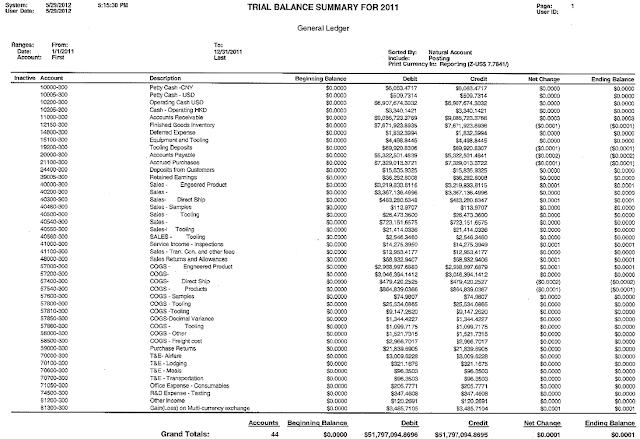
This one comes courtesy of my friend Steve Sieber at McGladrey . After installing Microsoft Dynamics GP 2010 R2 and deploying the SQL Server Reporting Services reports, you will encounter an issue when printing the GL Trial Balance Summary SRS report located under Financial. 1. Launch Report Manager and click on the company for which you would like to run the report (the issue can also be reproduced in the Fabrikam (TWO) company database). Click on Financial | Trial Balance Summary, enter all the parameters and options for the report the click on View Report , the following is returned: GL Trial Balance Summary - SSRS As you can see, even though the correct parameters are selected, the report returns no records. 2. If the GL Trial Balance Summary report is executed from GP with the same parameters, the report correctly delivers the expected records and result: GL Trial Balance Summary - GP From a technical perspective, the GL Trial Balance Summary SSRS r...