Posts

Showing posts with the label Extender

Extender Auto Open and Auto Close options not working in GP 2010

Image
Just recently, I came across an issue reported by a partner on Extender Auto Open and Auto Close options not working. Extender Auto Open and Auto Close options After implementing a simple Extender window on the Item Maintenance form, I ran a couple tests to confirm. Effectively, when I did open the Item Maintenance window, the Extender window did not open as expected. I then went to the Additional menu to open the Extender window and then closed the Item Maintenance window. The Extender window did not close along with the Item Mantenance form. My environment is Microsoft Dynamics GP 2010 with Service Pack 3 (11.00.2044), but the issue can be recreated on previous builds of Microsoft Dynamics GP 2010 as well. In the interest of full disclosure, I did not test this in any previous release of Dynamics GP, i.e., v10.0. The issue has been replicated by Microsoft and a problem report created for it, but no immediate fix date has been provided. If you are affected by this issue,...

SmartList Builder and creating Calculated Fields with Extender data

Image
Just recently, I ran into a case where the partner was creating a SmartList Builder calculated field using data from the  RM Open table (RM20101) via an Left Join table operation with the Extender Window Field Numbers . In fact, this is a very typical scenario for a lot of deployments where Extender is used, especially when you cannot use the standard Extender functionality to integrate with out-of-the-box smartlists. The original SLB calculated field look something like this: Extender Calculated Field When the SLB smartlist was deployed, a number of results came back as zero for the records where there was no entry in the Extender Window Field Numbers table, even when the Sales Amount and Current Trx Amount fields had a value in the RM Open File table. Paying a bit more attention to the issue made me think of how LEFT OUTER JOINs are processed by the Microsoft SQL Server query engine. This is best illustrated with the following example: RM Open ...

Unhandled script exception: Illegal address for field '[Not Found]' in script 'Unregister_Triggers'

Image
If you have recently upgraded to Microsoft Dynamics GP 2010 R2 , a few days aback, a partner reported receiving the following errors when returning from Report Writer: Unhandled script exception: Illegal address for field '[Not Found]' in script 'Unregister_Triggers'. Script terminated. EXCEPTION_CLASS_SCRIPT_ADDRESSING SCRIPT_CMD_LOAD_ATSI7 Unhandled script exception: Illegal address for field '[Not Found]' The error is followed closely by: Unhandled script exception: Object has no reference. EXCEPTION_CLASS_SCRIPT_BAD_PARAM SCRIPT_CMD_DEREF_TABLE Upon review, the error appears to be an issue with Extender and also happens when returning from Modifier. This issue has been written up as a bug and is scheduled to be fixed. To workaround the issue, exit Microsoft Dynamics GP 2010 R2 and log back into the system. Until next post! MG.- Mariano Gomez, MVP IntellPartners, LLC http://www.IntellPartners.com/

Opening a Microsoft Dynamics GP Extender window conditionally

Image
Today I came across an interesting request on the Microsoft Dynamics GP Partner Online Technical Community  - here on referred to as the Partner forum. The partner wanted to know if it was possible to open an Extender window based on a specific Sales Transaction Entry document type being selected. In particular, the partner wanted to have the Extender window open only when the document type was an invoice. Sales Transaction Entry window - Invoice The first thing that comes to mind for most hardcore technical resources is to write some VBA or Visual Studio Tools code to do this. While not impossible, recurring to this type of customization to achieve the partner's request, quickly becomes cumbersome and inflexible as a solution if more and more conditions are needed throughout the application or even the window. However Extender has a little known feature called Window Groups . A window group is made up of one or more windows. The windows that can be added to...

Parsing Long String fields in Extender for using with Report Writer

Image
A few days aback I came across a Partner Forum question where the partner was attempting to add an Extender field to a Report Writer report, not without his share set of challenges. In their infinite wisdom, the folks at eOne added a trigger to the rw_TableHeaderString Report Writer function which allows them to expose data to Report Writer without having to create alternate versions of a report in their application. In turn, with a few steps outlined in the Extender manual, users can invoke the rw_TableHeaderString as a user-defined function in a string calculated field to retrieve the piece of data needed from an Extender table by passing in the Window ID, the key fields, and the position of the field to retrieve on the Extender window. This is an example from such call: Calculated Field: EXTENDER_KEY Expression Type: Calculated Result Type: String Expression: STRIP( SOP_HDR_WORK.SOP Number ) Calculated Field: (C) AdditionalShippingInfo Expression Type: Calculated Result Type: Strin...

Using Business Alerts with Extender Tables

Image
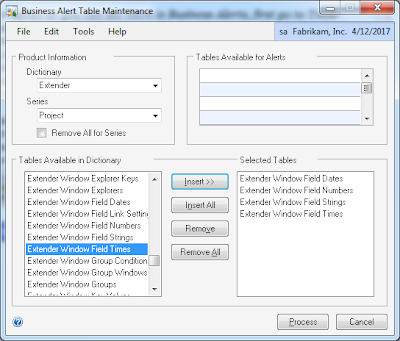
For those of you looking to create Business Alert events for Extender tables and data, follow these instructions provided by Microsoft's Dawn Langlie from the Partner Online Technical Community. " In order to add Extender tables so you can see them in Business Alerts, first go to Tools-Utilities-System-Business Alerts. Here is where you will select the tables. Pick "eXtender" as the Product and Pick "Project" for the series. If you are interested triggering off eXtender windows, the tables you will want to insert are the Extender Window Field Dates, Extender Window Field Strings, Extender Window Field Times and Extender Window Field Numbers. Then click the process button in the lower right corner. This will move the tables in the Tables Available for Alerts section. Then create your business alert by going to Tools-Setup-System-Business Alerts. Choose to create a new alert. Select your Database and give the Business Alert a name. In "Select Tables...

Transferring Extender customizations from one company database to another

Image
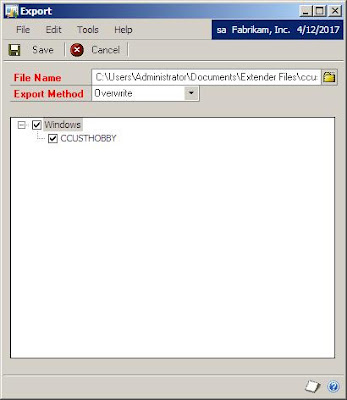
The Microsoft Dynamics GP public newsgroup is always an amazing source of inspiration for new articles, this time, along the lines of a topic that I have been following closely since the announcements of the additions in Dynamics GP 10.0 Service Pack 4: Extender . Today, we will explore two methods for transferring Extender customizations between company databases. Method 1: Extender's Export/Import functionality Extender offers a native method for transferring customizations between company databases with the following steps: 1. Open Extender 's Export window. Go to Microsoft Dynamics GP > Tools > Extender > Export. a) Click on the Folder button to select the path and enter the file name for your export. Hint: try to use the name of the customization being exported as the file name. b) Select the customization(s) to be exported by clicking on each of the objects. 2. Click Save to continue. This will create the XML export file with the customizations. 3. Switch co...

Sampling data from Extender tables

Lets be honest! One of the most confusing aspects of working with Extender is being able to tell where things get stored. Even though all table names are pretty clear and need not too much explanation, the bottom line is people still get confused when trying to figure out what is stored where. I for once, have spent some time working on a T-SQL script that will show all the data stored in Extender tables. I constantly use this method, because I can clearly see where things are when I need to look around for some way data got stored, without having to go executing SELECT statements one by one on each table. The method is broken down into two steps: the script that retrieves all the extender tables, producing a formatted SELECT statement, and the script (a result of the former script) which actually displays the data in each table. GetExtenderTables.sql -- Created by Mariano Gomez, MVP -- Code is "AS IS". No warranties expressed or implied and conferes no rights SELECT '...

Microsoft Dynamics GP roadmap

Image
For those of you who did not attend Convergence 2009 and have been asking about release dates of service packs and new versions of Dynamics GP, the following shows the anticipated product roadmap . Keep in mind that release dates and product features may change on a dime and by no means can be considered absolute Microsoft commitments. One things is very sure: Microsoft Dynamics GP 10.0 Service Pack 4 is just right around the corner and with it comes a revamped Extender product. For those of you wondering about the feature of the customization tools, David Musgrave has some reflections on that subject. Click here to read what he has to say. Plus I have the following to add: if you are a Microsoft Dexterity developer or a Visual Basic for Applications guy, Extender is still not the panacea for complex business requirements. Yes, you will be able to add new windows, yes you will have the ability to create transaction workflows . However, there is only so much Extender can do as ...

Mark Polino on Deleting Extender Windows

Image
Fellow MVP Mark Polino has important information for you if you happen to be working with Extender windows. Make sure you read his article on the subject BEFORE you attempt to remove that Extender window you have been working with for a few months now. Until next post! MG.- Mariano Gomez, MVP Maximum Global Business, LLC http://www.maximumglobalbusiness.com/

Victoria Yudin on Reporting on Extender Data

Image
Fellow MVP Victoria Yudin, goes to great lengths to explain how to report on Extender data . Extender can be a valuable time saving customization tool, but data storage can be confusing even to the pros. Remember that Extender stores data in separate tables according to data types and the only way compile the data is by creating Extender Views. Also don't miss out on her previous article about Extender and SmartList . Victoria provides great detail on how to accomplish this with screenshots that will help you understand the process from beginning to end. More importantly, let her know what you think about her work by dropping her a comment. Until next post! MG.- Mariano Gomez, MVP Maximum Global Business, LLC http://www.maximumglobalbusiness.com

Victoria Yudin on Adding Extender Data to SmartList

Image
Wow! So you have this fancy customization in Extender, but now you are stucked with figuring out a way to get the data out to SmartList. Sweat it no more! Fellow MVP, Victoria Yudin has a great article on SmartList and Extender . She also took the guessing work out of the picture by adding tons of screenshots and step by step instructions with a detailed example. One note: these same techniques can be applied to reports, so you solve this one and you also have the reports going for you. Please visit Victoria's blog and let her know what you think about her post. Until next post! MG.- Mariano Gomez, MVP Maximum Global Business, LLC http://www.maximumglobalbusiness.com/