Posts

Showing posts with the label Code

Calling SQL Server stored procedures from Microsoft Dexterity - revisited

Image
Back in January of 2009, I wrote an article showing a method of calling a SQL Server stored procedure from Dexterity by calling a stored procedure prototype script (sproc) in sanScript. See,  Calling SQL Server stored procedures from Microsoft Dexterity  (January 26, 2009). This sproc tells the runtime engine (Dynamics.exe) that it must connect to either the system or company database to run the stored procedure of the same name. I particularly like this method because it basically it shields the developer from dealing with connections, etc. Also, the procedure executes under the user's security context. However, there are times when it is necessary to go the extra mile, especially if you have to call procedures you do not want to prototype into your code as a sproc - case in point, calling third party stored procedures, or eConnect stored procedures. Enter the use of Dexterity SQL library functions and pass-through SQL. The Dexterity SQL library functions are well doc...
Building Microsoft Dexterity Cross-Dictionary Applications with GP Power Tools - Part 2/2

Image
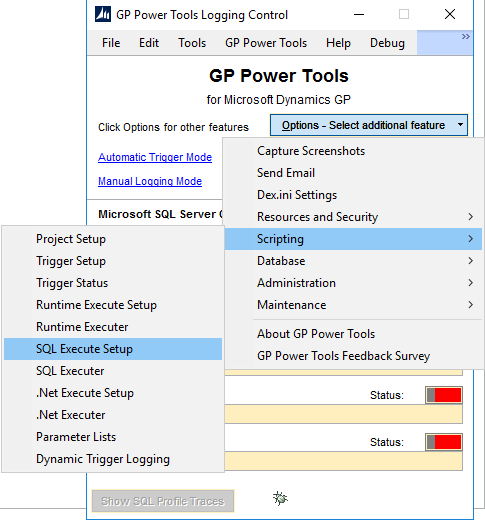
In Part 1 of this two-part series, we saw how to use the  Resource Information and the Runtime Execute Setup  features in GP Power Tools to gather the name of a List View object and model pass-through sanScript code that would set the image state of a specific line to checked (marked), based on an entity value in the list. As a refresher, the following video shows where we are at this point: Now this is all good, but technically speaking, this code should be parametrized to allow us to evaluate and mark a number of entities that will be coming from a setup table in my Dexterity application. We would want to iterate through that table, pass in the configured entities as parameters to this code, so they can be evaluated and marked if exists in the list. In this article, I want to show 2 more GP Power Tools features that will make your cross-dictionary code usable and transferable from GP Power Tools directly into your Dexterity application. SQL Execute Setup In the ...

Building Microsoft Dexterity Cross-Dictionary Applications with GP Power Tools - Part 1/2

Image
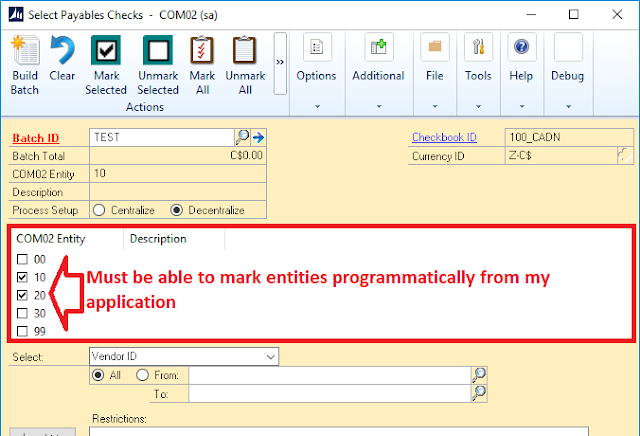
As part of an existing project I am currently working on, we need the ability to programmatically select the entities with the Binary Steam's Multi-Entity Management Select Payables Checks alternate window, when running a Decentralize process. In our software, users have the ability to pre-configure and save those settings, and our code needs to be able to set the values within the entity list view and drive the processing by clicking the Build Batch button. Binary Stream's Select Payables Checks alternate window Dexterity developers are constantly challenged by the difficulties of creating cross-dictionary code to interact with resource objects in third-party dictionaries, so I thought I would show some really cool features available in GP Power Tools, written by Microsoft MVP, David Musgrave , over at Winthrop Development Consultants, that can help developers test and package their cross-dictionary code more effectively, and without second guessing whether it will work...

Unhandled database exception Save operation on table 'ASI_SOP_HDR_MSTR_Explorer" has caused an unknown error (39)

Image
What if you end up creating a reminder based on a long running SmartList? It had to happen, right? As it turns out, if you create a reminder based on a long running SmartList, you will run into a nasty unhandled exception leading to an error 39, when launching Microsoft Dynamics GP. In this particular case, the user created a reminder based on the Sales Transactions SmartList to display existing Orders, except they did not filter out just the orders in the work table. When the user attempts to log into Dynamics GP, they get an hourglass cursor, which eventually ends up with the error: "Unhandled database exception Save operation on table 'ASI_SOP_HDR_MSTR_Explorer" has caused an unknown error (39)." Since the issue is caused by the reminder calling such a large SmartList query to be executed, it is best to eliminate the offending reminder. You can run the following T-SQL query to identify the reminder: -- Created by Mariano Gomez, MVP SELECT * FROM dbo.SY014...

"Get-Content : Cannot find path 'C:\en-US\Welcome.txt' because it does not exist" error when running GPPowerShellStart.ps1

Image
Lately, I have been dabbing into PowerShell. The truth is, I had been wanting to do this for the past 3 years now, to switch from DOS batch files and VBScript to a more robust, developer-like task automation alternative. So I thought myself PowerShell over the past few days and, in doing so, I decided I'd look into the GP PowerShell feature, so off I went installing it. Summary Directly from the PowerShell TechNet page, " Windows PowerShell® is a task-based command-line shell and scripting language designed especially for system administration. Built on the .NET Framework, Windows PowerShell helps IT professionals and power users control and automate the administration of the Windows operating system and applications that run on Windows. " More on PowerShell here . GP PowerShell is available for Microsoft Dynamics GP 2013 and above and can be found on the main application setup page. Setup page A couple clicks and you are ready to go. The Problem The GP P...

Microsoft Dynamics GP 2015 Developer's Preview: Dexterity Service Patterns - Part 5

Image
In my previous article (see Microsoft Dynamics GP 2015 Developer's Preview: Dexterity Service Patterns - Part 4 ), we discussed the merits of the Wrapped Window pattern and how it can save time by avoiding refactoring of complex business logic embedded on Dexterity forms. I also provided an intro on the Decoupled Logic pattern and why this is the preferred method for exposing Dexterity services as it provides the best performance. However, we also came to the conclusion that refactoring is only feasible in cases where decoupling the business logic from the UI will yield a reasonably increase in performance, without negatively impacting development and product release timelines. We also looked into the Decoupled Logic pattern considerations and today we will accompany these with sample code to clarify the meaning of each. Decoupled Logic Considerations In decoupled logic mode, there is no implicit data types validation or conversion. Unlike the Window Wrapped pattern ...

Microsoft Dynamics GP 2015 Developer's Preview: Dexterity Service Patterns - Part 4

Image
What a week of learning that reIMAGINE 2014 conference was! If you stayed for the post conference training classes, even more power to you. In my previous article (see Microsoft Dynamics GP 2015 Developer's Preview: .NET Framework Interoperability - Part 3 ), I talked about the .NET interop capabilities introduced in this iteration of Dexterity and how these new capabilities have become the foundation for unlimited extensibility options for Dexterity-based applications. Today, I wanted to talk about another aspect brought by .NET interop: Dexterity services. However, to understand Dexterity services, we must first take a look at the service implementation patterns. Wrapped Window Pattern Under the wrapped window pattern,  a complete Dexterity form or window logic is wrapped into a service. The goal is to instrument the user interface and leverage all the existing validation logic within a RESTful service as to avoid recreating that same logic s...

Microsoft Dynamics GP 2015 Developer's Preview: .NET Framework Interoperability - Part 3

Image
In part 2 of the series , I delivered a brief primer on the service architecture in Microsoft Dynamics GP 2015 and how you are able to consume services natively created with Dexterity. There are two types of services that can be created: services that wrap existing windows and forms functionality, i.e., creating a customer; and services that can wrap around existing sanScript procedures, i.e, retrieving customer information. The truth is, none of that stuff would be possible without the ability to interoperate with the Microsoft .NET Framework. Today, I'm going to show you some of the .NET interop capabilities built into Dexterity 14.0 and how these can enhance the user experience and your application integration capabilities. The example used in this post is based on my previous article, Building a COM Interop Assembly to use with Microsoft Dexterity , which showed how we had to leverage .NET's ability to expose an assembly via COM interfaces, so we could reference its metho...

Preventing Visual Studio Tools customization processes from being terminated by Microsoft Dynamics GP

Image
Just recently I ran into a case on the Microsoft Dynamics GP partner forum where the ISV developer was dealing with a potentially long standing process to be executed from within their Visual Studio Tools (VST) add-in customization. As a result of this long standing process, the developer wanted to prevent Microsoft Dynamics GP from closing while his process was executing. The Theory Part Typically, while a process is executing in Microsoft Dynamics GP a user attempting to close the application would receive the following message: Process are being run message However, Microsoft Dynamics GP can cause a Visual Studio Tools customization to abruptly shut-down if a user closes the application deliberately or accidentally. Microsoft Dexterity developers have never had to worry about this since Dexterity processes are managed by the call stack. A call stack is an internal Dexterity mechanism that manages the processing of scripts. Dexterity has eight call stacks; seven ar...

How to Display Parent Company Information on SOP documents

Image
A few days aback I encountered a really interesting discussion on the Microsoft Dynamics GP Community forum  where the user needed to get the parent customer information on the SOP Blank Invoice Form. I asked myself, "Well, how difficult can that be?" The first thought around these requests is, you create a table relationship between the Sales Transaction Work (SOP_HDR_WORK) table and the RM Customer Master (RM_Customer_MSTR) table by Customer Number and you get the parent customer ID. In that train of thought you immediately realize that there's no way to alias the RM Customer Master table back into the table relationship to retrieve the parent customer ID information. [NOTE TO SELF: this would be a cool Report Writer feature, but I digress.] Of course, a second alternative is to use VBA, but many customers and partners are wary of implementing a VBA solution, especially when they are considering upgrading to Microsoft Dynamics GP 2013 and taking advantage of the we...