Posts

Hybrid development for the Managed Code developer (cont.)

Image
In my previous article I outlined a hybrid development approach for managed code developers that allows for a C# or VB.NET programmer to make use of Modifier and Dexterity as complements to deliver a solution - see Hybrid development for the Managed Code developer . In summary, a managed code developer could leverage Modifier to effect changes on the core Microsoft Dynamics GP (or any add-on or third party product) user interface, then use Dexterity to create the table definitions and routines that will make those tables available on SQL Server - the added advantage? tables are exposed to Microsoft Dynamics GP security model and are created on the first launch of your dictionary and you can create an assembly for the dictionary to drive table operations from your Visual Studio Tools solution that will not require the use of ADO.NET or even the GPConnNet.DLL file to access the tables. Finally, your Visual Studio Tools code would be used to drive the user interface controls added with ...

Hybrid development for the Managed Code developer

Image
A few weeks aback, I co-presented a deep dive session with my partner in crime, David Musgrave, at Microsoft Dynamics Convergence Atlanta 2011 DDGP03 Microsoft Dynamics GP Customization & Integration Tools Review - see Microsoft Dynamics Convergence Atlanta 2011: Day 3  for more on what happened that day. During our session, we introduce a Visual Studio Tools sample that left a few managed code developers scratching their heads - a bit. The sample in question used Modifier, Dexterity, and Visual Studio Tools to provide a customization to the Vendor Maintenance window. So let's break down the customization. The Modifier bit One of the limitations of Visual Studio Tools is that it cannot modify existing Microsoft Dynamics GP windows to incorporate new controls. In addition, if this particular window, the Vendor Maintenance window, was a third party dictionary resource, frankly, Dexterity won't be the tool to modify the window either - Dexterity cannot modi...

Microsoft Dynamics GP 2010 R2 is hot off the press

Image
Microsoft has made GP 2010 R2 available prior to the original launch date of May 1, 2011. The product can be downloaded from CustomerSource or PartnerSource. For a look at a summary of the changes and improvements in this release, check out the What's New document . This release is available as a new DVD image as well as a Service Pack 2 patch for existing Microsoft Dynamics GP 2010 installations. The Fix List and Install Guide is also available for download. Note : Registration Keys for New Customers will not be available until the May 1, 2011 official release date. Also, the Word Template Generator is a new product for this release and is currently only available from PartnerSource. The links below are for the Product Release and Service Pack pages: PartnerSource Product Release Downloads for Microsoft Dynamics GP 2010 Word Template Generator for Microsoft Dynamics GP 2010 R2 Service Pack, Hotfix, and Compliance Update Patch Releases for Microsoft Dynamics GP ...

A Peek Behind the Convergence Eval Curtain - Follow Up

Image
MVP Mark Polino just released a really nice post about what goes on behind the speaker's curtain - see Convergence 2011: A Peek Behind the Eval Curtain . I thought I would pick up where he left with my own insight on the subject. Let's start by saying that  Microsoft Dynamics Convergence is the biggest stage on the planet for us speakers and presenters in the Microsoft Dynamics ERP and CRM world. The amount of time that goes into preparing our sessions, assembling presentations, handouts, and demos, and making sure we are ready by the time the event actually happens is ginormous. In our case (David and I) it's at the tune of more than 3 months and with a 12-hour difference - we are invited more than 6 months in advance, IF and when we get invited. For those of you who think we just show up on stage, there is no such thing. We actually have to earn our stripes to be in front of you every year. So how do we earn our stripes you may ask? Well, the firs...

How to schedule Dynamics GP to automatically log in and run an Integration Manager integration - revisited

Image
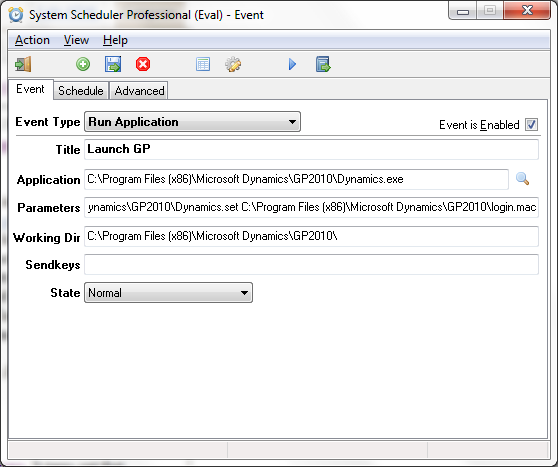
With my newly found stride, thanks mostly to Microsoft Dynamics Convergence Atlanta 2011 and the number of interesting questions I fielded during the event, I thought it was time to revisit the issue of scheduling Integration Manager integrations as part of our deep dive session, DDGP03 Microsoft Dynamics GP Customization & Integration Tools Review - see Microsoft Convergence Atlanta 2011: Day 3 for more on what transpired that day. If you have been a follower of my blog for sometime now, you will recall that back in January of 2009 (ok, I don't expect you to remember this) I posted an article on the subject - see How to schedule Dynamics GP to automatically log in and run an Integration Manager integration . In short, the article looked at using the Windows Task Scheduler to launch a batch file, which in turn would launch Microsoft Dynamics GP, which in turn would use a macro to log into the system, then run a previously created shortcut to run the integration...in summar...

Resetting Security Roles and Task with the Support Debugging Tool

Image
This is my first after Convergence post and I have to say, I came away with enough questions from attendees to fill the blog for the remainder of the year. One such questions came from someone attending the interactive discussion session on security, IDGP04-R2 Tips and Tricks for Maintaining Security in Microsoft Dynamics GP - see Microsoft Dynamics Convergence Atlanta 2011: Day 4 Morning Closing Session (Cont.) for more on what transpired that day. The individual in question wanted to know if there is a way or method to "reset" all Microsoft Dynamics GP security roles and tasks to the out-of-the-box defaults once these had been changed. After thinking about it for a bit, there is effectively a way using the Support Debugging Tool . Step 1 - Export the security tables from a brand new installation of Microsoft Dynamics GP In a brand new installation of Microsoft Dynamics GP, install and use the Support Debugging Tool's XML Table Export feature to create a SEC...

Microsoft Dynamics Convergence Atlanta 2011: Wrap up

Image
Well, another year, another Microsoft Dynamics Convergence , my birthday is past, and David is now home . It's amazing to think just a few days aback David and I were hosting a GPUG session and presenting 2 topics over 3 days, and all the work that went in to making our sessions a success - thanks to all of you who attended! As is customary, this post will provide a summary of (most) links where you can find information on Convergence just in case you were not able to attend the event or miss any of the previous posts. So let's get started: The Dynamics GP Blogster (this site): Microsoft Dynamics Convergence Atlanta 2011: Day -4 Microsoft Dynamics Convergence Atlanta 2011: Day -3 & -2 Microsoft Dynamics Convergence Atlanta 2011: Day -1 Microsoft Dynamics Convergence Atlanta 2011: GPUG DayONE Microsoft Dynamics Convergence Atlanta 2011: General Reception Microsoft Dynamics Convergence Atlanta 2011: Day 2 morning Microsoft Dynamics Convergence Atlanta 2011: Da...