Posts

How to resize logo in Microsoft Dynamics GP Word Templates
Image
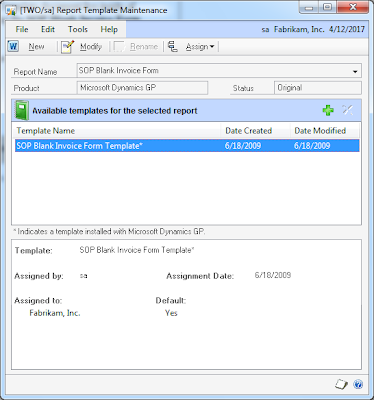
Getting used to the new Word Templates functionality can be a bit challenging at times. One of those challenges came in the form or a simple question: "How to resize the logo on the template?". One thing to keep in mind is that most objects on a Microsoft Dynamics GP Word Template document live inside of content controls. With that said, here are the steps to achieve this, taking the SOP Blank Invoice Form Template* as an example: 1. Under Report Template Maintenance , select the SOP Blank Invoice Form template from the More Reports list. 2. Click the New button to create a new template. For this example, we will create the template based on the existing template and we will call it SOP Blank Invoice Form Icon . Click Ok to continue. 3. Highlight the newly created template, then click the Modify button to open Microsoft Word. 4. Click on the Picture content control to add a logo image. Note: This image must also exist in the Image library under Template Config...

My first post over at Dynamics Latam

Image
My first post on COM interop and Dexterity is out over at Dynamics Latam ! This will be an excellent venue for me to give back to Spanish speaking community Microsoft Dynamics GP in North, Central, and South America and will sure up other venues to spread the GP gospel. Until next post! MG.- Mariano Gomez, MVP Maximum Global Business, LLC http://www.maximumglobalbusiness.com/

Debugging Microsoft Dynamics GP 2010 Word Templates

Image
In my previous article I outlined a few steps to add a page of terms and conditions to an invoice form. However, these changes did not come without their challenges. When I initially started out working on this customized template, my "natural instinct" was to add a new section to the Word template and unlink the header and footer from the previous section, then add the text. To complicate matters a bit more, I had added this new template as a modified version of a modified report - SOP Blank Invoice Form Template (Modified) . Typically this is what would be encountered in a GP environment anyways as most standard GP invoice forms were customized even before the Word Templates functionality even existed in GP. Somehow, these changes managed to crash and display a message in the Template Processing Exceptions(TPE) window and I ended up with this error: One or more templates could not be processed. View the exception log for more details. Well, that was a good start... b...

How to add a "Terms and Conditions" page to a Microsoft Dynamics GP Word Template document

Image
It's officially Microsoft Office Word Templates week here at The Dynamics GP Blogster ! With the integration of Microsoft Word Templates into Microsoft Dynamics GP 2010, the possibilities of delivering professional looking business facing documents increased 1000-fold. Now, Microsoft Dynamics GP users want to take full advantage of Word's editing and document formating capabilities to introduce extra information in their business facing documents that was simply quite complex or impossible to achieve with Report Writer. A common request among users is to add a Terms and Conditions page to a SOP invoice form. For this example, we will use the SOP Blank Invoice Form report. You can follow these steps to achieve just that: 1. If you haven't done so, enable the SOP Blank Invoice Form Template* report under the Template Configuration Manager window. Click Save to continue. 2.  Open the Report Template Maintenance window and choose the SOP Blank Invoice Form fro...

The Dynamics GP Blogster changes its motto!

Image
"Your Microsoft Dynamics GP World Without Barriers" When I first created this site and posted my first article back in March of 2008, my original goal was to show you, the reader, a number of tips and tricks I had learned over the years from working with Microsoft Dynamics GP and developing international localizations and customizations, hence the initial site's motto "A comprehensive resource for technical and functional tips and tricks for the Microsoft Dynamics GP platform" . Since that very first article, this site has published over 475 articles that have ranged from SQL scripts, to VBA customizations, to conference sessions, to events, to topics covered by other bloggers, and heck, even some CRM stuff (as it relates to GP). Popular among readers are some of the specialized content like The Technology Corner , which outlines what going on outside of the Microsoft Dynamics GP world that will eventually impact how you work with Dynamics GP; and From the N...

Microsoft Dynamics GP 2010 Service Pack 1 now available!

Image
Over at Inside Microsoft Dynamics GP , Andy Westby has news on the release of Microsoft Dynamics GP 2010 Service Pack 1. Customers and Partners can now download the new service pack from these links: CustomerSource: https://mbs.microsoft.com/customersource/downloads/servicepacks/mdgp2010_patchreleases.htm PartnerSource: https://mbs.microsoft.com/partnersource/downloads/servicepack/mdgp2010_patchreleases.htm NOTE: As of the time of this post, I could not download the new service pack as it seems the download site is already extremely busy. With the release of Service Pack 1, Microsoft will be launching 2 new online services. However, these have yet to be disclosed. Until next post! MG.- Mariano Gomez, MVP Maximum Global Business, LLC http://www.maximumglobalbusiness.com/

The Technology Corner: Linda Rosencrance looks at IE9 Beta across the CRM spectrum

Image
My friend, Linda Rosencrance over at MSDynamicsWorld takes a look at early attempts to run Microsoft Dynamics CRM 4 and 5 with the new Internet Explorer 9 Beta in her new article . She also features some of my earlier comments and findings with running Microsoft Dynamics GP 10.0 and Microsoft Dynamics GP 2010 with IE9 Beta. The bottom line is, IE9 Beta is not going to be supported by Microsoft whether you are running Microsoft Dynamics CRM or Microsoft Dynamics GP. Any attempts of running IE9 Beta should be conducted in a non-production environment. Until next post! MG.- Mariano Gomez, MVP Maximum Global Business, LLC http://www.maximumglobalbusiness.com/