Posts

Showing posts with the label From the Newsgroups

New Article on MSDynamicsWorld: Do's and Don'ts of Microsoft Dynamics GP Forums

Image
Many of you know me as an avid forum contributor - I can usually be found on the Microsoft Dynamics GP Partner Online Technical Community and every once in a while on the Microsoft Dynamics GP Community Forum . Today, I came across a new article from MVP Victoria Yudin , posted on MSDynamicsWorld .  Her article, titled Do's and Don'ts of Microsoft Dynamics GP Forums: More Real World Lessons is an excellent piece on what is expected (and not) from you when you are about to request assistance on a forum, whether you are a partner or a customer. We all fall victims of the moment and want to get a problem resolved ASAP, but there is certain etiquette you must follow to ensure that your question is properly addressed by those of us who are gladly ready to help. I can't remember how many times I have had to ask "what version and build number of GP are you referring to?" when a question is posted on a forum. The bottom line is, these little things help us research...

From the newsgroups: Changing item currency decimal places

Image
Every once in a while as consultants, we run into these requests that leave us scrambling for an answer. It is not at all strange to find companies that want to modify the currency decimal places supported only at the product level (item master), while wanting to maintain the currency decimals set from an accounting perpective (general ledger and financial reporting). For example, for product transaction purposes, some companies may require 3 or 4 decimal places, but for financial reporting and general ledger would still want to maintain 2 decimals. Here is what the consultant requested: Is there a way to change "Currency Decimals" on the Item Maintenance window after an item is saved? If the field is not accessible which field in which SQL table has to be changed? The answer comes courtesy of Microsoft's Tirumal Boppana from the Dynamics GP Online Partner Technical community forum. Tirumal outlines two methods that allow you to change your currency decimals and explai...

From the newsgroups: Tracking COBRA in Microsoft Dynamics GP Payroll (US only)

Image
This week's answer comes courtesy of Microsoft's Aaron Richards over at the Partner Online Technical Community , but first the question -- no names given to protect the innocent :-) We are using Dynamics GP2010. How do we track COBRA in Payroll. We are not using HR. Specifically, we are trying to track what the government reimbureses us. For example, we're trying to track 70% that we pay to the insurer on the 941 that we send to the government which eventually reimburses back from the government that we had paid. Please advise or point me to a reference for utilizing this. As stated by the partner, the customer is not using the HR module which has full COBRA tracking capabilities. Here is what Aaron had to say: Thank you for using Microsoft Online Communities. My name is Aaron and I will be assisting you with your questions today. This information was released when we started tracking COBRA in the hotfix pdf. It stated the following: Consolidated Omnibus Recon...

SmartList Builder "Display as a negative value based on field" option not working as expected

Image
Just recently on a newsgroup forum, a partner brought up an issue affecting SmartList Builder. The partner had just recently upgraded the client from version 9 and was testing the Smartlists the customer had built prior to the upgrade to ensure they were still working as expected. In the partner's own words: "It was working when we were on GP9, but now we're on GP2010 SP1 none of my fields set up with Negative Values are showing up with Negative Values. When I run the smartlist from the old GP9 server, amounts are showing negative amounts for Return documents. But when we run the smartlist on GP2010, the amounts are now positive amounts, and when I check the Set Field Options window, they are still set up to "Display as negative based on field" when SOP Type = Return." In order to verify this I launched GP 2010 and recreated the SmartList mentioned above by the partner, setting the field option for the Document Amount to display a negative value based on a...

From the Newsgroups: "The input tax for this range hasn't been entered. Do you want to continue calculating?" error when running VAT Return on Microsoft Dynamics GP v10

Image
While attempting to generate a VAT Return report for his customer, a partner ran into the following issue. Hi folks , weird one here. Have ran fine in the past,however we are now getting this error: 'The input tax for ths range hasn't been entered. Do you want to continue calculating? The only change is that we have now set up all the reverse charge functionality for EU VAT. So the question is, where is the VAT return looking for the input tax? Fortunately, the partner dog enough into this issue and found a solution which he did not mind sharing with the rest of the partner community. Ok fixed it! Extracted all the transactions in SmartLists for the tax reporting period, and pivot tabled them on the tax detail id, compared the id's to those setup in GP only to discover that a tax detail id used 6 times does not physicly exist, [I then] changed the tax detail id in SQL to rectify to the correct id. ID must have been deleted some how. So if you experience the same pro...

From the Newsgroups: What are those GL entries with reference SALESASMxxxx?

Image
Welcome to another edition of From the Newsgroups . The Microsoft Dynamics GP Online Partner Technical Community forum is one of those virtual places where you get to see and experience it all. One gets to become familiar with real life issues experienced by us partners keen enough to share our implementation and support issues. The following is a thread from the Online Partner Technical Community: Good afternoon. Our customer keeps getting these "mystery" GL postings [SALESASMxxxx] and wants to know why they are being generated but I cannot find any article or search that shows this document prefix for GP. Does anyone know what type of doc this is and why it may be generated automatically into GL? The answer comes courtesy of Tristan Thor Clores , a Microsoft Support Engineer. For transactions that have the SALESASM prefix in their description: These may mean that a sales invoice with a shortage override of a top level BOM (also known as finished good) was posted at one cost...

From the Newsgroups: What happened to Integration Manager "Save As" function?

Image
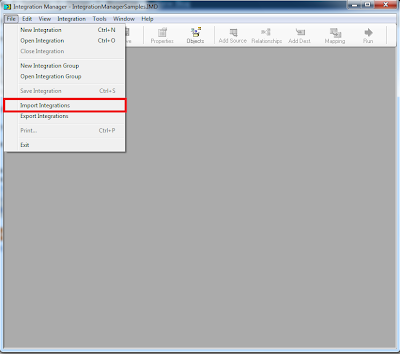
In previous versions of Integration Manager you had the ability to save an integration with another name, but v10 onwards this feature was removed. Here is what Beth Gardner from the Microsoft Dynamics GP Online Partner Technical Community had to say: "We removed the Save As functionality in one of the IM 10.0 service packs. The reason why, was the Save As feature had a bug with it for many years. It would copy the integration source file instead of creating a new integration source file in the new integration. This meant that if you were to change the source file on the second integration to browse to a different file, the original integration source file would also change. This caused a large amount of confusion and problems for customers. Due to this, we removed it from the menu. What you will need to do instead is use the File Import Integrations process. This will allow you to browse out the the IM.mdb file you currently have open and select integrations. You will then be p...

From the Newsgroups: Upgrading 150+ company databases

Image
This week the partner newsgroup takes on the topic of upgrades and you will be surprise to know the different approaches available to do upgrades for large amounts of company databases, especially when down time is not much of an option. Q: Have got a situation with a client with 150+ companies (databases) on version 9. Client is extememly downtime sensitive. Is there a supported upgrade technique or method to minimized downtime? The answer comes courtesy of Microsoft's Randal Mayer , Partner Technical Online Community moderator. A: The supported approach is to prioritize the databases by urgency and importance of being completed. It is the high priority databases which will require being upgraded first, validated, backed up and then released to production. For the remaining databases of less importance and less urgency, run Utilities to convert them afterwards ideally after hours. NOTE: All company databases are not required to be upgraded. In other words, once the system databa...

From the Newsgroups: Configuring Business Alerts to report posting errors

Image
Welcome to another edition of From the Newsgroups . In this installment we will look at a question posted in the Partner Online Technical Community newsgroup. The partner needed to know if it was possible to configure Microsoft Dynamics GP Business Alerts to submit posting errors to application adminstrators when using an auto-posting tool. Q : Is it possible to setup a GP Business Alert to notify someone when a scheduled SOP batch (or any other GP batch) fails to post? The background to this is we are using MC2 GP Agent module to autopost the imported SOP invoice batches. This will happen many times a day. To avoid the need for a person monitoring the automated posting process, we want an alert to be generated when the posting process fails. The response comes courtesy of Dave Bader , Moderator of the Partner Online Technical Community, enhanced by me with pictures to facilitate the explanation. I have been looking at the SY00500 which is the Posting Definitions Master and I have an o...

From the Newsgroups: Map icon becomes unavailable on Windows Server 2008 64-bit

Image
In another edition of From the Newsgroups we explore an issue found in Microsoft Dynamics GP 10.0 on 64-bit Windows Server 2008 or Windows Server 2008 R2. This issue was discovered as a result of a recent migration from Windows Server 2003 to Windows Server 2008. Q: Regarding the map icon in GP10 - for example, where you can open a map of a customer's address in MapPoint or in Bing Maps... My customer has just deployed new 64 bit Windows 2008 servers on their Citrix farm to replace the existing 32 bit Windows 2003 servers. I've migrated GP10 (SP4) over to the new servers, however the map icon is no longer visible. Also if I go to User Preferences, the drop-down list at the bottom is grayed out (usually allows you to specify whether to display maps in MapPoint or MapPoint Web). Anyone come across this? Is [this] not compatible with 64 bit machines or Windows [Server] 2008? The answer given to this question by David Musgrave , Escallation Engineer at Microsoft will surprise you...

From the Newsgroups: Safe Pay and Absolute Value of all Documents

Image
Welcome to another edition of From the Newsgroups , where you will find real life cases of everyday issues. This edition comes courtesy of the Microsoft Dynamics GP Partner forum: Q: I have setup Safe Pay Configurator. I am having issue with the overall [file] total, which I assigned as a Standard field, Check Amount, and then Amount type, Net Total. When we were testing for the trailing record, the overall document amount is coming out as Issued - Void which is correct because it's a net total, but the issue is our voids are coming without the negative sign so the value is off. Below is the example: Issued: 1,000 Void: 100 Overall total: 900 Our bank is requesting absolute value [ Ed: Checks + Voids ] so overall total should be 1,100. I exported the configurator and imported it to Fabrikam and it works/calculate correctly. Only thing we have different from Fabrikam is Multicurrency is not activated. When I tested it in Fabrikam, here's the result: Issued: 1,000 Void: -100 Ove...

From the Newsgroups: Multicurrency POP Receipts

Image
Welcome to another weekly edition of the new From the Newsgroups blog entry. This week's topic revolves around Multicurrency POP Receipts and a feature available in GP. As usual, no names will be given out, just the question and the answer. Q: Functional currency is CAN [Ed: Canadian Dollars]. Item has a receipt that was for qty of 6000 each at .62 each USD currency. Vendor is setup as a US vendor. In the fifo layers it shows a receipt for 5999 at .62 each then another line for a qty of 1 at $12.57. Why is the system showing two lines for this receipt and breaking out the exchange all in one line. The exchange should spread over the qty of 6000 not qty 1. We know there is an issue with split receipts when the item has more than 2 decimal points or there is landed cost involved. That is not the case here. This appears to be because of the exchange rate. The response is as follows: A: Good Day. Thank you for using Forums. With your exchange rate, it would appear that you have 600...

From the Newsgroups: FRx XBRL

Image
I am starting a weekly section called From the Newsgroups intended to bring some of the most intriguing questions and informative responses from the online technical community. To keep things relatively anonymous, no names will be given out... just the questions and the responses. The series open with a question posted on the Partner Online Technical Community forum regarding FRx XBRL capabilities: " I have a client who is working on converting FRx statements to the XBRL format. With service pack 11, we are able to use the 2009 taxonomies, which is great. She needs to submit her statements in XBRL format. There are a few questions that I cannot answer for her and am hoping someone can point me in the right direction. 1. XBRL format will not include calculated columns; XML format will. Is this a limitation of XBRL or FRx? 2. If FRx, can we use XML and then convert to XBRL? Can we export to Excel and convert to XBRL from there? 3. Any suggestions on the best way to view what the r...