Posts

Showing posts with the label Dynamics GP 2010 R2

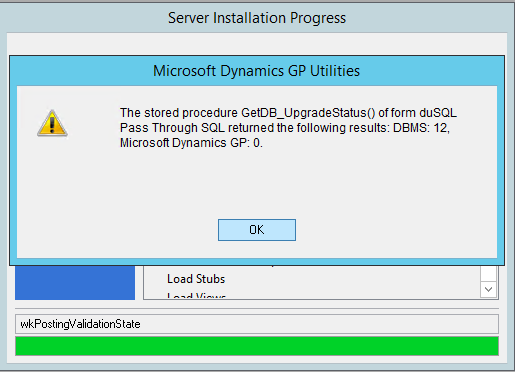
DBMS: 12 Microsoft Dynamics GP: 0 error when updating to Microsoft Dynamics GP 2013 R2
Image
Hello all! It's been quite a while since I've actually written anything of remote interest to anyone who follows my blog, but at the same time, you will be pleased to know that I've been quite busy in the consulting front, with upgrades, server migrations, complex multi-instance postings involving 10's of thousands of transactions, wrapping up some Field Service Automation projects, and the list goes on and on. This time around I want to bring to the forefront, an issue I encountered updating  from Microsoft Dynamics GP 2013 SP2 to Microsoft Dynamics GP 2013 R2 plus the latest service pack. Background My client requested a server migration to a new environment where they wanted to deploy Dynamics GP 2013 R2 web client (plus the latest service pack) and upgrade their relational database management system to Microsoft SQL Server 2014. This is something I'm absolutely comfortable with (for the most part) given also that my client was sitting at Microsoft Dynamics...

Working with Dex.ini Settings to customize the Microsoft Dynamics GP Connect gadget

Image
I take a pause in my Microsoft Dynamics GP 2015 Developer's preview series to bring something fun before the Thanksgiving holiday here in the United States. Hopefully you find this trick very cool and enjoy it in your workplace. Have you ever wanted to wake up with The Dynamics GP Blogster page as the centerpiece of your Microsoft Dynamics GP application homepage? Or how about your favorite online news outlet? What if you just want to display your company web page or an intranet portal to allow employees to update their information or view the latest company news? Today I will show you how to take advantage of two obscure Dex.ini settings to customize the Connect gadget. The standard Connect gadget displays Microsoft Dynamics Community news and updates, but there are two  Dex.ini keys used to enable runtime debugging of the Connect gadget. One of the Dex.ini  keys turns on the debugging feature and the other allows you to specify a URL to be displayed...

SmartList Builder: Displaying Negative Amounts based on Document Type

Image
Here's a nugget I picked up at GPUG Summit 2013 Tampa by attending the BDA06 Going Deep with SmartList Builder ( Complete survey ) session hosted by Nicole Albertson from eOne Business Solutions . Traditionally, whenever I needed to get, say, return document amounts or credit document amounts in general to show as negative in a SmartList, I would recur to the outdated method of setting up a calculated field based on a T-SQL CASE statement to take the document amount and multiply it by negative 1 (-1). The calculation looked something like this, in the case of a Return document in a Sales Transactions smart list: Calculated Field for a Negative Value based on Document Type This method has been used for several years now, but not without its flaws: 1. If you have a large data set, performance can be negatively impacted. Remember, the more calculations, the more pass through SQL that needs to be executed by SmartList Builder. This method in particula...

Microsoft Dynamics GP Excel Dashboards

Image
Over the past two weeks, I have downloaded, installed, and been playing with my latest demo toy: Excel Dashboards for Microsoft Dynamics GP! In all fairness, this is not a new product, but rather a research being conducted by the Microsoft Dynamics GP Product Management team on the subject of Business Intelligence. However and to drive the topic, they have created a really cool dashboard using Microsoft Excel 2013, which I also happen to be running on my machine. Excel Dashboard Installation The first thing to do is to download the dashboard which you can find here . Of course, most of the settings are tailored for my friend and Microsoft Program Manager, Jared Hall 's computer, who kindly put this dashboard together for your delight, so some work is needed to make things work. Once you have downloaded the spreadsheet, you will need to follow each of the steps provided on the Instructions sheet in the workbook, including running an embedded stored p...

Extender Auto Open and Auto Close options not working in GP 2010

Image
Just recently, I came across an issue reported by a partner on Extender Auto Open and Auto Close options not working. Extender Auto Open and Auto Close options After implementing a simple Extender window on the Item Maintenance form, I ran a couple tests to confirm. Effectively, when I did open the Item Maintenance window, the Extender window did not open as expected. I then went to the Additional menu to open the Extender window and then closed the Item Maintenance window. The Extender window did not close along with the Item Mantenance form. My environment is Microsoft Dynamics GP 2010 with Service Pack 3 (11.00.2044), but the issue can be recreated on previous builds of Microsoft Dynamics GP 2010 as well. In the interest of full disclosure, I did not test this in any previous release of Dynamics GP, i.e., v10.0. The issue has been replicated by Microsoft and a problem report created for it, but no immediate fix date has been provided. If you are affected by this issue,...

Brian Meier talks Microsoft Dynamics GP Business Analyzer

Image
Business Analyzer is one of those products that I really dig: it's slick, it works, and it just makes life easier for executives and information consumers who don't necessarily need access to GP... but if they do, Business Analyzer also lives within GP, with some pretty cool context sensitivity, based on the info displayed by a specific item or items within a Navigation List object. Brian Meier, Sr. Lead Program Manager at Microsoft, explains his role and provides an inside look at Business Analyzer. Related Articles: Kevin Racer talks Microsoft Dynamics GP 2013 Architecture Chad Sogge describes the features process for Microsoft Dynamics GP 2013 Until next post! MG.- Mariano Gomez, MVP IntellPartners, LLC http://www.IntellPartners.com/

Microsoft Dynamics GP 2010 now compatible with Microsoft SQL Server 2012

Image
For those of you who have been wondering about Microsoft Dynamics GP 2010 compatibility with Microsoft SQL Server 2012, it's now official! You can find the hot topic article on CustomerSource and PartnerSource at: CustomerSource - Microsoft Dynamics GP and Microsoft SQL Server 2012 Compatibility PartnerSource - Microsoft Dynamics GP and Microsoft SQL Server 2012 Compatibility Click on the image above to find out more about Microsoft SQL Server 2012 and to download the evaluation version. I just found something to play around with during my Spring break. Until next post! MG.- Mariano Gomez, MVP IntellPartners, LLC http://www.IntellPartners.com/

SSRS: GL Trial Balance Summary report returns no data - Follow Up

Image
Back in July of last year, I wrote an article on a reported issue with the SSRS GL Trial Balance reports were not returning any data with Microsoft Dynamics GP 2010 and 2010 R2 (SP2) - see SSRS: GL Trial Balance Summary report returns no data . Since then, this problem has been documented in KB article 2588519 - GL Trial Balance SRS Reports return no data using Microsoft Dynamics GP and a workaround provided in the same article to fix the ailing stored procedure, dbo.seeglPrintSRSTrialBalance , causing data not to be returned. The good news is, this problem is scheduled to be fixed in Service Pack 3. Until next post! MG.- Mariano Gomez, MVP IntellPartners, LLC http://www.IntellPartners.com/

Terminal Server: Dynamics.exe encountered a problem and needed to close

Image
Just recently I assisted a partner with an issue they were having on a Terminal Server environment, after upgrading from Microsoft Dynamics GP 9.0 to Microsoft Dynamics GP 2010. Upon launching Microsoft Dynamics GP, an end-user was receiving the error shown below: Dynamics.exe Error Clicking on the hyperlink for the error detail showed the following: Error Signature I have faced a number of issues of this type in the past and typically they are all narrowed down to corrupt forms and/or reports dictionaries - both Dynamics and third-parties. However, this seemed different, since other Terminal Server users were not experiencing the same issue. The Event Viewer, however, showed a bit more details about the issue: Event Viewer The Event Viewer information was in effect confirming that the faulting application was indeed the Runtime Engine, Dynamics.exe. However, interestingly enough, it was showing that the faulting module was the msvcr90.dll . In doing some search, I...

Navigation List Builder not redeploying changes to a previously saved list

Image
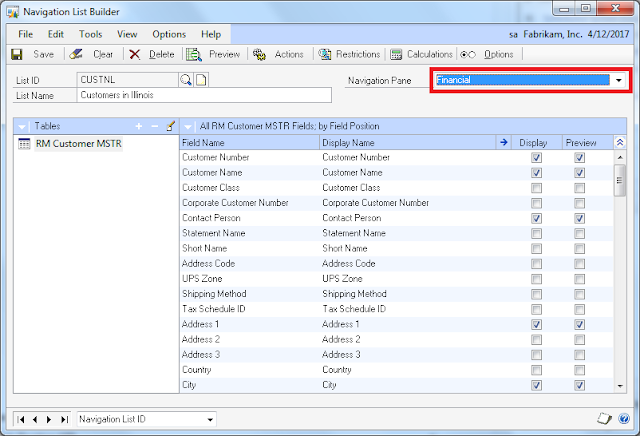
During the Drill-Down Builder and Navigation List Builder training session (for class materials, click here ) I held at GPUG Academy Training Day 1 in Las Vegas, prior to the GPUG Summit, I found that Navigation List Builder had an issue redeploying changes done to a previously created and saved navigation list. In reality, this issue came up days before when I was preparing the class, but I really did not give it much thought and attributed the problem to an 'environmental' issue on my machine. The Microsoft Dynamics GP version is 2010 R2 (11.00.1752). One of my students saved his navigation list to the wrong series and deployed the list. All things worked, except the navigation list was showing up under the Financial bar, instead of the Sales bar where it should have been saved to initially. Navigation List Builder - list saved to the wrong series Upon realizing the miscategorization of the list, the student returned to Navigation List Builder to make the proper adj...

Microsoft Dynamics GP Home Page scripting errors on Citrix XenApp

Image
For the past 2 weeks I have been working on a fairly complex installation of Microsoft Dynamics GP for a hospitality staffing company whose hardware infrastructure is hosted by a very reputable provider. My client has made all their applications available to their end users via Citrix XenApp . Xenapp is Citrix Systems' secure on-demand application delivery platform for the Citrix Presentation Server. After completing the installation of Microsoft Dynamics GP on the Citrix Servers, the next step was exposing the application to XenApp. This by all accounts is a fairly straightforward process. I logged into XenApp, launch Microsoft Dynamics GP and everything was working fine: home page, reports, SSRS reports, Business Analyzer, Management Reporter, the whole 9 yards! A couple days later, users began reporting home page script errors as the one shown below: Typically, if you follow the prescribed KB article 918313 - Frequently asked questions about the home...

Running Fixed Assets Depreciation causes Microsoft Dynamics GP to "hang"

Image
I just completed a full upgrade of Microsoft Dynamics GP from version 9 to version 2010 R2 for a client and they were going through their first month-end closing in the upgraded system. 3 weeks ago, after the upgrade, they reported experiencing an issue running Fixed Assets depreciation from two laptop computers, where apparently, when running depreciation the system would hang. The only option to recover would be to terminate the Dynamics.exe process from Task Manager. Nonetheless, we did not pay much attention to this at the time since the process was completed successfully from another machine, just in time to close the month of August - more on this later. The client called back on Thursday morning, letting me know they were ready to run Fixed Assets depreciation again, and this time I offered to be onsite to see the problem first hand. So effectively this past Friday morning I drove to their location and stood behind the Sr. Accountant to see the process in action ...

Default Printer not 'sticking' when running Microsoft Dynamics GP in Terminal Services RemoteApp

Image
A bit of theory... RemoteApp programs are programs that are accessed remotely through Terminal Services and appear as if they are running on the end user's local computer. Users can run RemoteApp programs side by side with their local programs. A user can minimize, maximize, and resize the program window, and can easily start multiple programs at the same time. If a user is running more than one RemoteApp program on the same terminal server, the RemoteApp programs will share the same Terminal Services session. The following Microsoft TechNet article explains in more detail: Terminal Services RemoteApp (TS RemoteApp) Background Microsoft Dynamics GP (versions 10.0 and 2010), is currently supported in a Terminal Server RemoteApp environment, but a number of my clients and forum users have reported in numerous occasions that the Default Printer settings are not 'sticking' or simply saving when loging out of the application (which also closes the RemoteApp session) an...

Integration Manager for Microsoft Dynamics GP 2010 hangs when running an integration - Follow up

Image
After some additional testing to find the route cause of Integration Manager 2010 hanging, it seems the issue has been narrowed down to a glitch in one of the slides cycled by the Connect gadget on the home page, and not an issue with the Microsoft .NET Framework 3.5 as originally thought. For those of you who follow closely on the community news through the Connect gadget, you may have noticed the service being down since last Friday - around the same time Microsoft Support started receiving reports on the issue. Sources tell me that this was done as part of the standard testing protocol to discart new functionality causing the problem. The slide causing the issue was removed this afternoon and the Connect service has been restored. If you were getting prepared to apply a new hotfix or service pack, you will be glad to know there may be no need to do so. Stay tuned for further updates. Until next post! MG.- Mariano Gomez, MVP IntellPartners, LLC http://www.IntellPartn...

Integration Manager for Microsoft Dynamics GP 2010 hangs when running an integration

Image
The forums are hot with users and partners reporting an issue with Integration Manager for Microsoft Dynamics GP 2010 hanging when running an integration. Everyone seems to agree the issue started sometimes this past Friday, August 5, 2011, with most users reporting a normal behavior and the ability to run trouble free integrations prior to that date. This issue has been written up under the following hot topic article Integration Manager for Microsoft Dynamics GP 2010 is Unresponsive at the Beginning or End of an Integration   [link broken as hot topic has been retired] According to a Microsoft representative with the Escalation Engineering team: Our development team has identified the issue to be the result of a change in .Net Framework 3.5. At this point our development team is working on creating a new Integration Manager build which will then undergo testing to verify the build and that the issue has been resolved. As soon as we have a new IM build that resolves th...

SQL: Assigning Microsoft Dynamics GP Users to SSRS Database Roles

Image
As I begin to wrap up a Microsoft Dynamics GP 2010 R2 production upgrade from Microsoft Dynamics GP 9.0, I ran into a small issue at my client. After deploying the new SSRS reports, and as users were getting ready to try them out, we realized that some 15 logins needed to be assigned to a number of the 24 default database security roles created for the SSRS reports. User Mappings (some information blurred to protect the client's identity) This would be a bit cumbersome giving the share number of clicks required to accomplish this feat. In addition, we had just setup Microsoft Dynamics GP security, and given that the SSRS database roles were similar to those in GP, something needed to be done to automate the assignment of these roles based on Microsoft Dynamics GP security roles. As a result, I created the following script: -- Created by Mariano Gomez, MVP -- This code is licensed under the Creative Commons -- Attribution-NonCommercial-ShareAlike 2.5 G...

SSRS: GL Trial Balance Summary report returns no data

Image
This one comes courtesy of my friend Steve Sieber at McGladrey . After installing Microsoft Dynamics GP 2010 R2 and deploying the SQL Server Reporting Services reports, you will encounter an issue when printing the GL Trial Balance Summary SRS report located under Financial. 1. Launch Report Manager and click on the company for which you would like to run the report (the issue can also be reproduced in the Fabrikam (TWO) company database). Click on Financial | Trial Balance Summary, enter all the parameters and options for the report the click on View Report , the following is returned: GL Trial Balance Summary - SSRS As you can see, even though the correct parameters are selected, the report returns no records. 2. If the GL Trial Balance Summary report is executed from GP with the same parameters, the report correctly delivers the expected records and result: GL Trial Balance Summary - GP From a technical perspective, the GL Trial Balance Summary SSRS r...

Support Debugging Tool Build 15 now released

Image
These are exciting times... the Support Debugging Tool Build 15 has been released! If you attended our session, CSGP014-R2 Administering Microsoft Dynamics GP Like a Pro with the Support Debugging Tool  during Convergence Atlanta 2011 , you may recall that the features David Musgrave (author of the Support Debugging Tool) and I presented were all part of the Build 15 beta release at the time. Since then, the Support Debugging Tool has been propped up with a number of enhancements and bug fixes that make the wait while worth. Support Debugging Tool Build 15 - UI Facelift Take a look at David Musgrave's release article, Support Debugging Tool Build 15 released , for a complete list of fixes, enhancements, performance improvements, usability and  features included in the new build. Build 15 is only available for Microsoft Dynamics GP 10.0, Microsoft Dynamics GP 2010, and Microsoft Dynamics GP 2010 R2. You can download Build 15 at: Support Debugging Tool for Microsoft ...