Posts

Showing posts with the label Visual Studio Tools

Installing Visual Studio Tools for Microsoft Dynamics GP project templates for Visual Studio 2017

Image
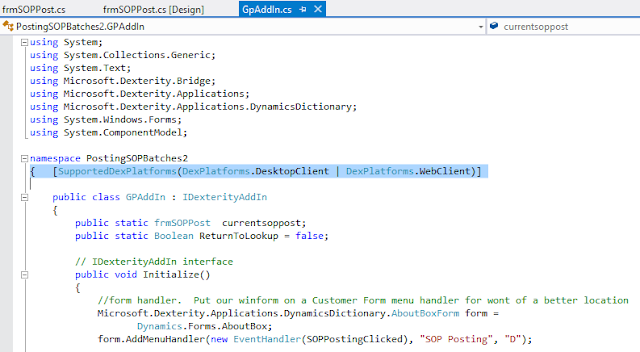
While in Johannesburg attending GPUG Amplify South Africa 2018, my friend of 1000 battles and fellow MVP David Musgrave and I sat down to prepare for our Day 1 sessions. Mariano Gomez and David Musgrave at GPUG Amplify South Africa 2018 In particular, we were preparing for our Microsoft Dynamics GP 2018 Customizing the User Interface session, which featured updated material and sample code from the ones we had shown at previous sessions. In a cursory review of his environment, we noticed that he did not have the Visual Studio Tools for Microsoft Dynamics GP templates installed. David noted that he was running Microsoft Visual Studio 2017 on his machine and that the GP 2018 templates did not support this version of Visual Studio. In fact, SDK templates are provided for Visual Studio 2010 through Visual Studio 2015 as of the release of Dynamics GP 2018. I quickly remembered that my good friend in the UK, Tim Wappat had created the extension manifest files for the VST projec...
Microsoft Dynamics GP Roadmap Update

Image
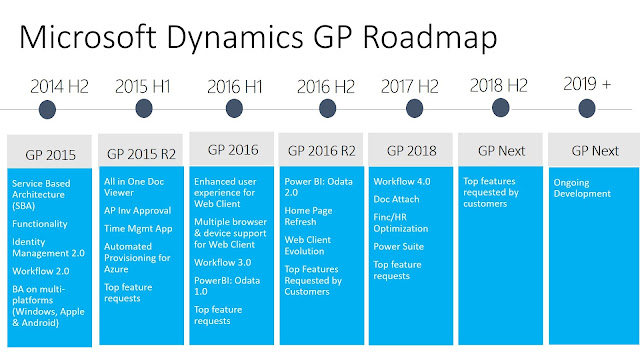
It's been a week since I got back from GPUG Amplify 201 7 in Anaheim, California and tell you the truth, I am all the more excited about the future of Microsoft Dynamics GP than a lot of you might be. With all these constant rumors of the product going away or not getting the necessary TLC from Microsoft I am left to wonder, where have I heard this before :-) The truth is, Dynamics GP is alive and well, thank you! And will be for many many years to come. As it's been unveiled in Anaheim, the next couple of years - Microsoft has been producing the roadmap for only 2 years at a time ever since GP 2010 - promise to bring some really cool enhancements to the product, based on entries collected via Microsoft Connect . In particular, GP 2018 (shipping sometimes before the end of Q4) will be introducing 3 major themes that traverse the spectrum of features you would expect from an application born in the on-premise world, but that has effectively cross over to power customers lo...

VST: An error occurred while loading or initializing an addin

Image
As I mentioned before, I am now the Lead Software Engineer at Mekorma. I love it here as I get to work with some really talented software engineers and developers, all of which challenge me everyday. One of the cool new products we are working on, Mekorma Multi-Batch Management, allows you to build payment batches, print and post payments, and generate electronic funds transfer (EFT) and positive pay (Safe Pay) files, across companies, and across multiple checkbooks, with some minor configuration and just the click of a button. You can see an in-depth video on the product here . Part of the challenges of building Multi-Batch Management were its extensive interfacing with both our own Mekorma MICR product and Microsoft Dynamics GP, and in particular, the Safe Pay module - Multi-Batch Management is designed to drive the Microsoft Dynamics GP user interface, thus eliminating the need for invasive code. If you have worked on integrating code for Microsoft Dynamics GP, you are certainl...

Microsoft Convergence Atlanta 2015 (#CONV15) - Day 2

Image
Wow, Day 1 sure proved to be very exciting with all the big keynotes, general sessions , and presentations , not to mention the whole Expo reception. It also seemed like the night went by flying and sleeping was overrated. To add to the mix, Atlanta's Tuesday morning traffic came back with a vengeance and did not really allow David and I to make it down on time for some early sessions we had planned to attend, oh well! As a result, we ended up going to the Speakers' Room to finalize our last bits of demo code for our upcoming session, only to discover we were not using "best practices" as noted by our Microsoft friend Rob Bernhardt . Since we are very keen to deliver best practices in our Service Based Architecture code (more on this on a separate post). This put us in a tailspin, so we went looking for Kevin Racer to offer some advise. We finally got what we were looking for, just 10 minutes before our session. Off we went to look for our dual A313/314 room ...

The Dynamics GP Blogster Best Articles of 2014

Image
How about this 2014 year, ah? Two major releases in Microsoft Dynamics GP 2013 R2 only to top off the year with the recent release of Microsoft Dynamics GP 2015 . More than 30 new features in 2013 R2 (over 150 if you include those released in GP 2013 RTM) and now over 120 new features in Microsoft Dynamics GP 2015, including the cornerstone .NET interoperability and Service Based Architecture components, it's no wonder why the Microsoft Dynamics GP Product Management and Product Development teams deserve a massive showing of the hands on this one! Congratulations team on a job well done. Let's not forget about the events either: the wildly successful Microsoft Convergence 2014 Atlanta , the hugely concurred GPUG Summit 2014 St. Louis , and what's got to be the most anticipated partner event since the days of Stampede, reIMAGINE 2014 in Fargo. All these events drove the vision of t Travel was also off the chain for me: Johannesburg, South Africa; St. Louis,...

Working with the Dex.ini Settings in Microsoft Dynamics GP 2013

Image
Dex.ini settings have always existed to provide developers and end-users with ways to set a number of preferences for their Microsoft Dynamics GP application without the need of additional development or customizations. With the release of Microsoft Dynamics GP 2013 and the web client, the Dex.ini now plays a key role in enabling (or disabling) certain elements rooted in the system's architecture itself. Today, I will address 3 new Dex.ini keys that will assist every day system administrators, developers, and hosting partners in managing their Microsoft Dynamics GP 2013 environment. Per-User Dex.ini With the introduction of the web client in Microsoft Dynamics GP 2013, the development team needed to make a few changes to how the Dex.ini file is handled. The result is a launch Dex.ini file (or global Dex.ini) that contains the settings necessary to get the user connected to Microsoft Dynamics GP; and a user-specific Dex.ini file that contains the user settings used after a succ...

Preventing Visual Studio Tools customization processes from being terminated by Microsoft Dynamics GP

Image
Just recently I ran into a case on the Microsoft Dynamics GP partner forum where the ISV developer was dealing with a potentially long standing process to be executed from within their Visual Studio Tools (VST) add-in customization. As a result of this long standing process, the developer wanted to prevent Microsoft Dynamics GP from closing while his process was executing. The Theory Part Typically, while a process is executing in Microsoft Dynamics GP a user attempting to close the application would receive the following message: Process are being run message However, Microsoft Dynamics GP can cause a Visual Studio Tools customization to abruptly shut-down if a user closes the application deliberately or accidentally. Microsoft Dexterity developers have never had to worry about this since Dexterity processes are managed by the call stack. A call stack is an internal Dexterity mechanism that manages the processing of scripts. Dexterity has eight call stacks; seven ar...

Microsoft Dynamics GP 2013 Virtual Machine image from the Windows Azure Gallery

Image
Part 2/2 -  The Experience In my previous article, Part 1 of the series , I talked about provisioning a Microsoft Dynamics GP 2013 development environment from the Windows Azure gallery. If you are already an MSDN subscriber and are already taking advantage of Azure, there isn't much new to you as far as provisioning a VM from the gallery goes. Microsoft Dynamics GP 2013 VM image One of the first things you will notice on the desktop are shortcuts to Microsoft Dexterity , Microsoft Dynamics , Visual Studio Base Image Icons , a link to the Getting Started with the Microsoft Dynamics GP 2013 Developer Image , and Visual Studio 2013 Premium Edition . I started out by loading the Getting Started help file, which contains tons of information on all the development tools installed and links to resources. I then proceeded to open Visual Studio 2013, which of course, went through the traditional and lengthy initialization process after entering my Microsoft Account information....

Microsoft Dexterity Training Roadshow begins next week - First stop Atlanta

Image
It's that time of the year again! Here at Intelligent Partnerships we are pushing hard for the revival of Microsoft Dexterity education as a fundamental bridge to understanding and developing powerful applications for Microsoft Dynamics GP. Our Microsoft Dexterity Training Roadshow saw at least 40 people in the first year we launched the program, in 2013, visiting 5 cities in the process. This time around we hope you take advantage of a variety of Microsoft Dexterity training programs, ranging from entry level, to intermediate and advanced levels. All training materials and labs have been carefully developed and prepared to meet today's development practices and standards for Microsoft Dynamics GP 2013 and the Web Client. We have also designed a program specifically for Dexterity developers wanting to carry their skills forward into the Visual Studio Tools development platform. At the end of each course, you will receive a certificate of comple...

The Dynamics GP Blogster Best Articles of 2013

Well, this year was quite the year in the Microsoft Dynamics GP world! Everything from partner readiness training events for Microsoft Dynamics GP 2013 Web Client around the US., to Convergence in New Orleans from which I happened to walk away with a severe case of pinkeye  ( side note: what was it with that city? I heard of more than 100 people attending the Conference walking away ill with anything ranging from stomach flues, to fever, to pinkeye, to...well you get the point ), to the actual launch of Microsoft Dynamics GP 2013 and the web client, to the Microsoft Dynamics GP Technical Airlift in Fargo, ND, to the GPUG Summit in Tampa, to the MVP Global Summit in Seattle which counted for the first time with Microsoft Dynamics GP content. Who could also forget the release of the Business Analyzer Windows Store app and the marathon of features released with Microsoft Dynamics GP 2013 SP2, forcing my dear friend Pam Misialek to write another set of Feature of the Day articles. Wo...

Visual Studio Tools for Microsoft Dynamics GP 2013 and Microsoft Visual Studio 2013

Image
A few weeks aback I talked about Updating your Visual Studio Tools for web client development environment  and soon after I started receiving numerous emails from developers wanting to know if they could leverage the current Visual Studio Tools 2013 SP2 (VST) templates with Visual Studio 2013.  As of yet, Microsoft has not released Microsoft Dynamics GP Add-In and Microsoft Dynamics GP Web Client Add-In templates for Visual Studio 2013, but with the help of my good friend Michael Hammond , Sr. Engineering Lead at Microsoft I have instructions on how to move the current Visual Studio 2012 templates to Visual Studio 2013 1. Locate the current VST templates folders under your Microsoft Visual Studio 2012 program files folder. These can usually be found as follows: Visual C# templates folders C:\Program Files (x86)\Microsoft Visual Studio 11.0\Common7\IDE\ProjectTemplates\CSharp\Dynamics GP C:\Program Files (x86)\Microsoft Visual Studio 11.0\Common7\IDE\ItemTemplates\CSharp\...

Microsoft Dexterity Training back by popular demand

Image
(C) Microsoft Corporation You asked for it and we are responding to your request. Given the success of our past Microsoft Dexterity training roadshow, we are launching a new round of training sessions for 2014. This time, we have expanded the number of training offers to cover advanced Dexterity topics, and for the first time, we are introducing Visual Studio Tools for Dexterity developers (and .NET developers too). DEX001: Microsoft Dexterity Fundamentals - classes in Atlanta, Miami, and Toronto DEX002: Advanced Microsoft Dexterity Development - classes in Boston and Montreal DEX003: Visual Studio Tools for Microsoft Dexterity Developers - classes in Las Vegas and Seattle. Want to attend, but don't want to leave your offices? We will come to you. (*) You can find all about each class offered on our training page . For more information, contact Chuck Boyles at +1 (678) 993-6971. (*) Some restrictions apply. Until next post! MG.- Mariano Gomez, MVP IntellPa...

VST: Rendering WinForms in Microsoft Dynamics GP web client

Image
In my previous article I discussed applying Service Pack 2 to update your VST development environment. The SP2 update introduces the ability to render VST WinForms in the Web Client. Background Prior to the release of Microsoft Dynamics GP 2013 RTM, the application development and technical consulting communities got to preview the web client at the Microsoft Dynamics GP Technical Airlift 2012 in Fargo in a Web Client Jumpstart Training for partners . Following the training and attendance to some sessions, VST developers got the bad news : "Only Dexterity applications are fully compatible with the web client". That left a number of you with the proverbial (and probably literal) bad taste in the mouth and scrambling for answers. Microsoft came back with a consolation price announcement: "Only VST applications written without using WinForms will be supported in the web client". In retrospect, I feel the message could have been delivered differently, but I digr...

VST: Updating your Visual Studio Tools Web Client Development Environment

Image
Microsoft Dynamics GP 2013 SP2 (12.00.1482) introduced some really cool new updates to a lot of application components. Yesterday, for example, I talked about the SmartList Designer  and how it really takes the SmartList experience to new heights. Visual Studio Tools and Microsoft Dynamics GP 2013 SP2 introduce support for WinForms rendering on the Web Client - more of that in my next article, but before we get into the details, here's what you need to know to prep your development environment: 1. You must install Visual Studio Tools for Microsoft Dynamics GP Service Pack 2 in your system. The VST msi update can be found under MDGP2013_SP2_DVD_ENUS\Tools\SDK\VS Tools\Updates folder in the full DVD image available from CustomerSource or PartnerSource. This should bring the VST components to version 12.00.1488.00 while updating all templates in your Visual Studio development environment. Visual Studio Tools SP2 build number check Control Panel | Programs 2. ...

Accessing Microsoft Dynamics GP Default Settings from Visual Studio Tools

Image
Rarely you will hear the Dex.ini file being called the Microsoft Dynamics GP defaults file. However, the Dex.ini contains keys (and their associated values) that define how Microsoft Dynamics GP behaves in some cases. For example, SQLLastUser=sa stores the login of the last user who accessed the system on that specific instance of Microsoft Dynamics GP, in this case, 'sa'. Likewise, AutoInstallChunks=TRUE, allows Microsoft Dynamics GP to bypass prompting the user for new code (chunk file) to be installed at the time of launching the application. There are other settings controlling how certain features behave. You can find a list of Dex.ini settings here . Recently, I was helping a good friend of mine up in Maine who attended my Dexterity class in Boston and this time he wanted to know how to read the path for the Microsoft Dynamics GP help file. Of course, there's a simple (predefined) method for this as my good friend Patrick Roth with the Escalation Engineering team...