Posts

Showing posts with the label Receivables Management

Microsoft Dynamics GP 2016 Feauture of the Day Series - Week 5

Image
Week 5 was a "slow" week, but still very packed with good information. Dynamics GP gains a new licensing user type called a Named Self-Server User which allows for tighter integration into application security. Now you have your choice of creating a consolidated deposit for all cash receipts in a batch or posting each cash receipt as an individual deposit entry. Finally, you can get a lot more granular with attachments flow and editing in Doc Attach which should serve more companies through out the ecosystem. Monday, April 18, 2016 GP 2016 Feature of the Day: Named Self Serve User Tuesday, April 19, 2016 Dynamics GP 2016 Feature of the Day: Automatically Batch Deposit Cash Receipts Wednesday, April 20, 2016 GP 2016 Feature of the Day: Manage/Edit Attachment Flows Until next post! MG.- Mariano Gomez, MVP

Microsoft Dynamics GP 2016 Feauture of the Day Series - Week 1

Image
A busy schedule or perhaps constant movement from one client site to another may have prevented a lot of you from noticing the release of the new Microsoft Dynamics GP 2016 Feature of the Day series. As customary, my good friend Pam Misialek  (twitter:  @PamMisialek ) has began publishing insights into the soon to be released Microsoft Dynamics GP 2016. Here is a summary of the articles published last week: Wednesday, March 23, 2016 Microsoft Dynamics GP 2016 Feature of the Day: Web Client Friday, March 25, 2016 Dynamics GP 2016 Feature of the Day: Web Client Part 2 Friday, March 25, 2016 Dynamics GP 2016 Feature of the Day: Web Client Search Friday, March 25, 2016 Dynamics GP 2016 Feature of the Day: Sales All In One Document Viewer Please stay tune for my summary articles compiling all these features in one place. I will be expanding on some of them soon. Until next post! MG.- Mariano Gomez, MVP

Microsoft Dynamics GP 2013 "Feature of the Day" - Week 5 Digest

Image
Week 5 of the "Feature of the Day" series over at Inside Microsoft Dynamics GP is a mix bag of pleasant surprises: improvements in Sales Order Processing, Accounts Receivable, Human Resources/Payroll, and the Dexterity Runtime Engine, you could easily see how keeping track of all these things at once could drive anyone to the loony bin. As usual, this is where I come in by compiling all these features in one place for your delight. Feature of the Day: Relate-Link Items for Suggested Sales Two new windows: Suggest Sales Item Entry and Suggest Sales Item Maintenance Original article: Feature of the Day: Relate-Link Items for Suggested Sales Link to presentation: GP2013 Relate-Link Items for Suggested Sales.ppsx Learning script: N/A Feature of the Day: Cetification, Licensing, and Training Management CLTM now allows to delete history (password protected) and rows Orginal article: Feature of the Day: Cetification, Licensing, and Tra...

Codename GP "12" Preliminary Features Series - 3 of 4

Image
Codename GP "12" Preliminary Features - Part 3  This is article is part 3 of 4 from the series Codename GP "12" Preliminary Features . Some images and content reproduced with express permission from Microsoft Business Solutions, a division of Microsoft Corporation. DISCLAIMER: These features are subject to change. If you were taken by the Simplicity and  Productivity features , then you will be more impressed with the this new list of features aimed at enhancing the Microsoft Dynamics GP product depth. Product Depth features Receivables Management Enhancements As of the current release, it has always been necessary to enter and apply multicurrency cash receipts as a two-step process. MC Apply in Cash Receipts will now allow you to take a cash receipt entered in originating currency and apply it against an invoice all in the same transaction entry process. Payables Management Void of Check Return Applied Credits (return/credit memo) to reusable...

Wise up with Wiseguy

Image
Just a few days aback, I wrote an article referencing the acclaimed 1984 movie, Ghostbusters. In this occasion, my friend and fellow MVP, Mark Polino , makes an appearance with his new short fictional story, Wiseguy. Wiseguy is a new twist to the classic mob tale. Prospective mobster Joey is stunned to learn that the family business is going to start filing tax reports with the IRS due to the power of Microsoft Dynamics GP. With the help of Jersey girl, Isabella, Joey must learn to collect cash using Microsoft Dynamics GP, instead of the traditional baseball bat method. Wiseguy highlights some powerful features in Microsoft Dynamics GP including the Collections module, Accounts Receivable, EFT, and Scheduled Payments. It also highlights The Closer and The Validator . The story shows how learning Microsoft Dynamics GP can be fun and entertaining. You can download Mark's work for free using a code from Reporting-Central  - With a name like Gianmarco Salsano backing up Mark, y...

Configuring Email for Sales and Purchasing Documents in Microsoft Dynamics GP 2010

Image
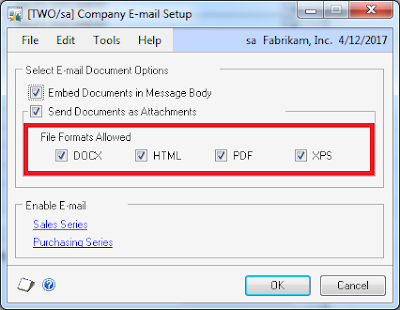
Recently, I have been receiving a number of questions on the new Sales documents email functionality in Microsoft Dynamics GP 2010 and how to get it configured and working adequately. If you know me by now, I love to translate those questions into useful articles for the Microsoft Dynamics GP community at large. Fortunately enough, the configuration process is not that difficult. Microsoft Dynamics GP 2010 allows this feature to be configured in a top-down approach which in turn ensures that all related areas of the application are email- aware. As a first step, there is a setup needed to be done at the company level - MSDGP > Setup > Company > E-mail Settings, or if you prefer, click on Administration on the Navigation Bar, then locate the E-mail Settings link under the Setup web-part: The first settings you will be able to configure is whether you want the actual document embedded as part of the email body or as an attachment to the email itself. My preference is the latter ...

What are all those GPSFOINTEGRATIONID columns in some tables

Image
I thought I would close the week with a very little known fact to new comers (and some not so new) to the Microsoft Dynamics GP world. First some history Around mid 1998 (or so), Siebel Systems formed an alliance with the then Great Plains Software Inc. to deliver a suite of front- and back-office applications. Great Plains' back-office applications included an integrated suite of accounting, financial, and supply chain modules. Under the agreement the new suite would add Siebel's front-office applications covering sales, marketing, and e-business functionality. The combination would allow users to complete sales transactions over the Web, for instance. Great Plains delivered the first component of its new package in November 1999 as the Sales and Marketing Series of Great Plains Siebel Front Office , with customer service and call-center applications to follow in 2000. The suite was aimed at small and mid-sized businesses. The new Great Plains Siebel Front Office product would...

SQL - Autogenarating Customer IDs

Image
I have been swamped lately working on 3 different projects, and it's been difficult to get back to blogging as often as I am used to. However, this week I found myself with an interesting situation where my client needed to import a customer master list into GP, but was migrating from a system that autoassigned an internal key to each customer record. My client wanted to move away from this "unique internal number" to an alphanumeric nomenclation similar to that of Fabrikam, for example, Aaron Fitz would have a customer ID of AARONFIT0001. They thought it was a very intuitive way of identifying customers and that it would serve the AR staff well. The customer data was staged in a SQL database and the goal was to create a query that will assign these customer IDs based on the customer name. So, here is the solution: AutoCustomerID.sql -- Created by Mariano Gomez, MVP SELECT -- evaluates the 9 first characters of the customer name and removes any blanks -- other characte...

New Article on MSDynamicsWorld: Michael Johnson on "Filtering Salesperson-specific data with SSRS"

Image
"It didn't take long to figure out that the problem wasn't with Business Portal, but rather the way they were trying to use it and NOT using SQL Server Reporting Services (SSRS). Both tools have a place in their environment, but one is not a substitute for another" My friend Michael Johnson , a.k.a. "The MBS Guru" has finally come out of hiding and has decided to publish a really clever solution for filtering salesperson-specific data in GP using SSRS over at MSDynamicsWorld. The good thing about Michael's solution is, you can apply it to pretty much any report that requires such type of access and filtering capabilities. They don't call this guy the MBS Guru for nothing! Until next post! MG.- Mariano Gomez, MVP Maximum Global Business, LLC http://www.maximumglobalbusiness.com/
"End of Month + Net Days" payment terms due date calculation

Image
Folks across the pond use payment terms and due dates that are not traditionally close the ones we are familiar with on this side of the hemisphere. "End of Month + Net Days" (EOM+ND) is a typical case. In EOM+ND payment terms, an invoice becomes due a number of net days after the last day of the month for the invoice date. For example, if an invoice date is July 16 and we are on a payment term of EOM plus 45 net days, the invoice will not be due until September 14 -- or 45 days from July 31. Of course, you cannot manage this type of payment term request in GP, not out-of-the-box anyways, which most of the time will require a customization to deal with the issue. In this article, I will examine setting up two SQL Server triggers: one on the PM Transaction Open File (dbo.PM20000) and another on the RM Open File (dbo.RM20101) tables. The triggers will use the Net Days field in the Payment Terms Master (dbo.SY03300) table to calculate the net days after the end of month to as...

Asset-based lending and receivables factoring

Image
Factoring receivable invoices is the sale of an asset - your company's invoices. The sale of your invoices to a third party - known as a Factor - eliminates the sale-to-collection business cycle of waiting for a customer payment. Usually, factoring companies will purchase your invoices for up to 90% of the total amount. You get your cash now and the factor takes on the risk of collecting the payments from your customers. The creditworthiness of your customers is very important if you want to get a good rate from a factor. What are the specific advantages? Immediate cash with no waiting and without incurring new debt: You receive quick payment following invoicing. To factor, your business credit rating is not an issue because you are not borrowing money Efficient handling of all your invoicing and data entry Relief from the responsibility for collecting no-pay and slow-pay clients You have expanded growth capacity through increased production and total sales Ability to take advantag...

How to setup "No payments, no interests until June 1, 2009" payment term in Microsoft Dynamics GP

Image
Business Situation The current economic climate is forcing businesses to be a bit more creative. Some of these companies are resorting to No interest, no payments terms that allow customers to walk out the stores with the merchandise and begin payments at a future date. But, how is a company using Microsoft Dynamics GP going to deal with this type of payment term? What if the promotion is only being ran for the month of December only? What if all invoice generated in December are all due simultaneously on June 1, 2009 regardless of the date the invoice was generated? Solution Implementation Since invoices from SOP and RM flow to the RM Open table (dbo.RM20101) after they are posted, it is safe to say we can add a SQL Server trigger to overcome the hurdle. However, we must setup a payment term ID that will serve as an identifier for our trigger to take action. Follow these steps to implement the solution to this problem: 1) Setup a new payment term called JUNE012009 . Open the Payment ...

How to create a Go To link to the Apply Sales Document window in SmartList Builder

A few days aback, my buddy Jim Harris at TurboChef was having an issue with creating a Go To in SLB that would link open credits and return documents displayed in SmartList to the Apply Sales Documents window in GP where he could effectively apply documents that had not been applied to invoices, etc. I thought, how complicated could that be? You open SLB, you setup your SmartList fields then, setup your restrictions for RM Document Type-All equal or greater than 7, and add the Go To by matching the Customer Number field on the window to the Customer Number in the RM Open Table, the Document Type on the window with the RM Document Type-All field in the table, and the Document Number in the window withe the Document Number in the table, a few clicks to close and save, build and... not so quick! At first the Apply Sales Document window filled in the Customer Number and Document Number, but screamed at the Document Type field. I figured, my restriction was wrong, so I went back in and che...

Resolving SQL Duplicate Key Error Message When Executing RM Paid Transaction Removal

This is one of those issues that I cannot fathom why the Microsoft Dynamics GP development team has not address in its RM Paid Transaction Removal procedure. It seems when the RM module gets "out of sync" -- usually after a crash of some sort -- it will cause transaction records to post between the RM Open table (RM20101) and the RM History table (RM30101). Unfortunately, for the end-user the problem is only evident when executing the Paid Transaction Removal operation, since they are likely to experience the following error message: (Microsoft)(SQL Native Client)(SQL Server)Cannot insert duplicate key row in object 'dbo.RM30101' with unique index 'AK3RM30101'. In addition, rebuilding the RM Key table (RM00401) does not solve the problem as the system will not know what to do with the same record found on both open and history tables. Given this situation, I have written the following query to identify and help in resolving the issue -- the query must be execu...

Suppressing Voided Documents from Customer Statements

Image
Microsoft Dynamics GP is a feature-rich product with the ability to include and exclude a good amount of information via the user interface, but when it comes to simple practical aspects such as suppressing voided documents from a customer statement, well it kind of falls short. No worries though! This article presents detail steps on how to suppress voided documents on customer statements without involving any programming. For this example, I will be using the RM Statement Long Form (any statement will do) and will devide the process into 2 phases. So, lets get started. Phase I - Setup the new relationships to expose the Void Status field Since the document void status cannot be obtained from the current tables in the relationship, it will be necessary to create a relationship to the RM Open table. 1) Print the statement you would like to modify to screen and hit CTRL + F9 on your keyboard. Close ALL opened windows once in Report Writer. 2) Click the Tables button on the too...

Removing Child Records from a National Account

Image
This is an actual problem I faced at an actual customer of mine a few months aback and posted today on the Google's Dynamics GP board . It seems that more often than one could assert, a customer's payment records get assigned to the wrong national account (or parent account). This can cause problems down the road when incorrect statements or aging reports are submitted to the corporate customer. In light of this issue, I developed a two fold solution: 1) The following query identifies the credit documents posted and applied by the parent customer on behalf of the child account. -- Created by Mariano Gomez, MVP -- This code is licensed under the Creative Commons -- Attribution-NonCommercial-ShareAlike 3.0 Unported License. -- http://creativecommons.org/licenses/by-nc-sa/3.0/legalcode -- Created by Mariano Gomez, MVP -- This code is licensed under the Creative Commons -- Attribution-NonCommercial-ShareAlike 3.0 Unported License. -- http://creativecommons.org/licenses/by...