Posts

Showing posts with the label System Manager

#MSDYNGP: Named Printers and Redirected Printers in RDP environments
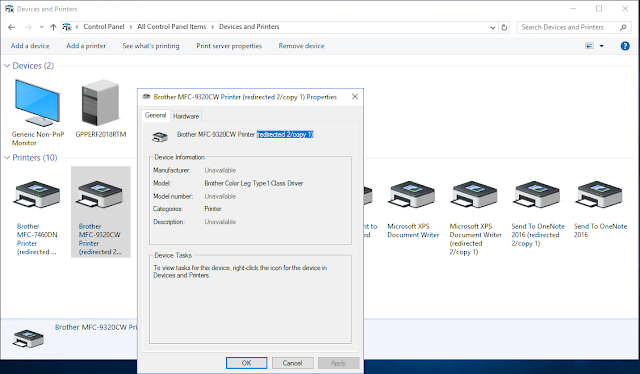
Image
A lot of the guiding principles for deploying Named Printers in a Terminal Server or Citrix environment comes from two of my favorite articles, written by my good friend and fellow Microsoft Business Applications MVP, David Musgrave  (twitter: @winthropdc ). David happens to be the creator of Named Printers and probably understands the product better than anyone I know. You can read his articles here: Using Named Printers with Terminal Server Using Named Printers with Terminal Server Revisited These articles continue to be very relevant if you are in an environment where a Print (or Printer) server is the norm and published printers are standard. Print servers are used to interface printers with devices in a network, but mostly to standardize administrative policies, and balance the document load that printers can manage. Part of the standardization is to ensure printers are uniquely identified across the networks, regardless of whether you are accessing the network remotely o...

Installing Microsoft Azure Integration Runtime

Image
The Integration Runtime (IR) is a customer managed data integration infrastructure used by Azure Data Factory to provide data integration capabilities across different network environments. It was formerly called as Data Management Gateway. It is used by Business Central and Dynamics GP to provide a one-way data synchronization between your on-premises SQL Server hosting your company databases, and your Business Central tenant data store in the cloud via Azure Data Factory. The self-hosted IR is capable of: Running copy activity between a cloud data stores and a data store in private network. Dispatching the following transform activities against compute resources in On-Premise or Azure Virtual Network: HDInsight Hive activity (BYOC), HDInsight Pig activity (BYOC), HDInsight MapReduce activity (BYOC), HDInsight Spark activity (BYOC), HDInsight Streaming activity (BYOC), Machine Learning Batch Execution activity, Machine Learning Update Resource activities, Stored Procedure activ...

Provisioning a Microsoft Dynamics 365 Business Central demo tenant

Image
With the release of Microsoft Dynamics GP 2018 R2, I had a first look at the update process, then quickly ran into a situation where the option to set up intelligent cloud insights wasn't showing in my already provisioned Microsoft Dynamics 365 Business Central tenant - See,  "Set up Intelligent Cloud" option not showing for Microsoft Dynamics 365 Business Central tenants . I also noted that this option was available with the October '18 Release  and that the current tenants would be undergoing upgrades within the next 30 days. In the meantime, if you want to familiarize yourself with the process of deploying intelligent insights, you will need to provision a demo tenant, built on the October '18 release. Here's how you do this: 1. Launch your browser and enter https://demos.microsoft.com in the address bar. This will take you to the Microsoft demo site. The site can be accessed either with your Microsoft account or your Work account (organizational or...

"Set up Intelligent Cloud" option not showing for Microsoft Dynamics 365 Business Central tenants

Image
I was (still am!) seriously excited about the release of Microsoft Dynamics GP 2018 R2 - I mean, how can you not? This Intelligent Cloud thing is just superb! The simple premise of being able to sync your data to Microsoft Dynamics 365 Business Central and use the power of the cloud to get actionable insights is just too good to pass up on. See my article,  Microsoft Dynamics 365 Business Central: the perfect complement for Microsoft Dynamics GP users . In fact, I already had an Office 365 Business Premium tenant provisioned with an instance of Dynamics 365 Business Central for IW. This is my playground, where I learn about the new stuff, where I try to build up my AL development skills, etc., (albeit at a turtle's pace 😊). After updating my GP 2018 RTM instance to GP 2018 R2 , I proceeded to setup the Intelligent Cloud Insights which, in a nutshell, involves setting up an integration between my on-premises Microsoft Dynamics GP application databases and Microsoft Dynamics 3...

Microsoft Dynamics GP July Hotfix packed with some long awaited features

Image
If you missed it, the Microsoft Dynamics GP Development team has delivered the July Hotfix for versions 2015, 2016, and 2018. What has me really excited are a number of features that were included in this release - I will skip the bug fixes as those are always welcome - as follow: Support for TWAIN drivers Why is this important? TWAIN is an API and a communications protocol that regulates communication between software applications and digital imaging devices, such as image scanners and digital cameras. As it turned out, this is EXACTLY what the Document Attach feature needed to overcome some reported compatibility issues with certain scanning devices - Dynamics GP only provided support for Windows Image Acquisition (WIA) protocol . For additional information on TWAIN, click here . Applies to GP 2016 and GP 2018. Web Client support for Non-US regional date settings For users with a regional setting date format other than MMDDYYYY, web client will now display the proper date ...

Deploying Microsoft Dynamics GP on an Azure SQL Managed Instance - Part 3/3

Image
In Part 1 of this series, I walked through the process of signing up for an Azure SQL Managed Instance preview (further referred to herein as "Managed Instance" for simplicity sake) and the subsequent deployment process once approved. In Part 2 , I looked at some of the issues you would ran into during the deployment of Microsoft Dynamics GP, particularly around the use of Dynamics GP Utilities to create an environment from scratch. From reading these two articles you may have concluded -- rightfully so -- that it's not possible to deploy Microsoft Dynamics GP using a Managed Instance PaaS. This article focuses on a deployment approach that works. Migrating Microsoft Dynamics GP to an Azure SQL Managed Instance Since Dynamics GP Utilities is not yet equipped to create databases on a Managed Instance, the only way to take advantage of this new service is via a migration. This is, taking your on-premise databases and restoring them onto the cloud database service. ...

Deploying Microsoft Dynamics GP on an Azure SQL Managed Instance - Part 2/3

Image
In Part 1 of this series, I walked through the process and experience of signing up for the Azure SQL Managed Instance preview and the deployment process once approved. I also covered some of the issues I ran into. In this installment, I will take a look at deploying Microsoft Dynamics GP and, again, looking at the process and experiences I encountered while doing so. Pre-Microsoft Dynamics GP Deployment One of the steps within the deployment of a Managed Instance is the provisioning of a VM to be able to connect to the service. The instructions call for downloading and installing Microsoft SQL Server Management Studio on the VM. I figured, this is the VM I would also be using to install Dynamics GP, IIS, and Web Client. NOTE : Currently, you cannot connect to a Managed Instance from outside of the Azure vNet infrastructure, and frankly it makes a lot of sense. A few things I noticed right off the bat after connecting to the Managed Instance: a) A Managed Instance is confi...

Unhandled database exception Save operation on table 'ASI_SOP_HDR_MSTR_Explorer" has caused an unknown error (39)

Image
What if you end up creating a reminder based on a long running SmartList? It had to happen, right? As it turns out, if you create a reminder based on a long running SmartList, you will run into a nasty unhandled exception leading to an error 39, when launching Microsoft Dynamics GP. In this particular case, the user created a reminder based on the Sales Transactions SmartList to display existing Orders, except they did not filter out just the orders in the work table. When the user attempts to log into Dynamics GP, they get an hourglass cursor, which eventually ends up with the error: "Unhandled database exception Save operation on table 'ASI_SOP_HDR_MSTR_Explorer" has caused an unknown error (39)." Since the issue is caused by the reminder calling such a large SmartList query to be executed, it is best to eliminate the offending reminder. You can run the following T-SQL query to identify the reminder: -- Created by Mariano Gomez, MVP SELECT * FROM dbo.SY014...

Copying Quick Links from one Microsoft Dynamics GP user to another

Image
Just recently, I ran across a question on the Microsoft Dynamics GP Community forum asking for a way to copy Quick Links from one user to another. Users can tailor their Quick Links by clicking on the Customize this page...  link on the upper right corner of the Microsoft Dynamics GP homepage. Quick Links setup These settings are stored in the syHomePageQuickLinks  table (dbo.SY08140) at the system database level. However, if you want to deploy a set of Quick Links based on a template user ID, it becomes quite the challenge to have to assist each individual user in doing so. The following SQL script allows you to copy all entries from a Source_UserId to a Destination_UserId account in Microsoft Dynamics GP: -- Created by Mariano Gomez, MVP USE DYNAMICS GO DELETE FROM dbo.SY08140 WHERE USERID = 'Destination_UserId '; INSERT INTO dbo.SY08140 (USERID ,SEQNUMBR ,TYPEID ,CmdID ,CmdFormID ,CmdDictID ,DSPLNAME ,ScbTarget...

Microsoft Dynamics GP Security and Audit Field Manual

Image
My friends, MVP Mark Polino ( @mpolino ) and Andy Snook ( @snookgofast ), both members of the Fastpath team, have just released a comprehensive security book titled, Microsoft Dynamics GP Security and Audit Field Manual . The book can be found in printed and Kindle formats on Amazon.com and I encourage you to get a copy, read up, and put into practice as this book goes beyond the boring task of assigning security to windows and reports just to prevent someone from accessing some area of the application, and into the realms of compliance, separation of duties, and audit controls. The book can be found in printed and Kindle formats on Amazon.com and I encourage you to get a copy, read up, and put into practice as this book goes beyond the boring task of assigning security to windows and reports just to prevent someone from accessing some area of the application, and into the realms of compliance, separation of duties, and audit controls. Finally, I want to take the opportunity...

#FabrikamDay: the holiday that wasn't

Image
Yesterday was ceremoniously an unofficial holiday. That's right! The date did not show up on any local or international calendar, it wasn't part of any federal or state registry. Frankly, the world did another spin on its axis without skipping a beat and life for billions of people on this planet went on without a hitch - OK, I'm not trivializing what's going on around some problem spots in the world, but I digress. Not so for a few hundred in the Microsoft Dynamics GP community of customers, partners, and independent software vendors (ISVs). We celebrated our own 'holiday' of sorts: #FabrikamDay . Breaking it all down To understand what Fabrikam Day is , you first have to ask yourself, " What is Fabrikam? ". Fabrikam (and more precisely, Fabrikam, Inc. or Fabrikam, Ltd, formerly The World Online) is the sample company used for demos, development, and testing in Microsoft Dynamics GP. The sample company provides sample data for all core and extende...

Revisiting: The Dexterity OLE Container

Image
Welcome to the first article in my  Revisiting series. Today I'm going to talk about the now defunct Dexterity OLE Container feature in Microsoft Dynamics GP. However, not because the technology is dead, it means that you don't have to deal with OLE notes. If you are coming from older versions of Microsoft Dynamics GP and upgrading to, say, GP 2013 R2 onward you have to be substantially aware of OLE notes: how are you going to migrate these and what is there in place to replace them. Summary In principle, OLE is a compound document technology from Microsoft based on the Component Object Model (COM) . OLE allows an object such as a graphic, video clip, spreadsheet, etc. to be embedded into a document, called the Container Application. The Dexterity OLE Container is part of the Dexterity Shared Components . In OLE compound document technology, it is the OLE client application ( CONTAIN.EXE ), which holds the linked or embedded objects. The Dexterity OLE Container first surf...