Posts

Transferring Extender customizations from one company database to another
Image
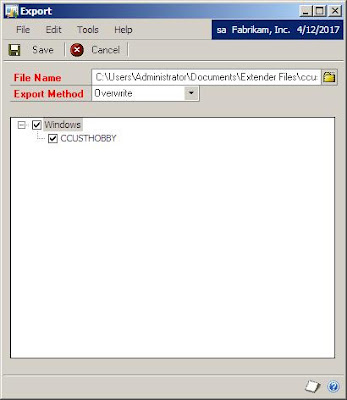
The Microsoft Dynamics GP public newsgroup is always an amazing source of inspiration for new articles, this time, along the lines of a topic that I have been following closely since the announcements of the additions in Dynamics GP 10.0 Service Pack 4: Extender . Today, we will explore two methods for transferring Extender customizations between company databases. Method 1: Extender's Export/Import functionality Extender offers a native method for transferring customizations between company databases with the following steps: 1. Open Extender 's Export window. Go to Microsoft Dynamics GP > Tools > Extender > Export. a) Click on the Folder button to select the path and enter the file name for your export. Hint: try to use the name of the customization being exported as the file name. b) Select the customization(s) to be exported by clicking on each of the objects. 2. Click Save to continue. This will create the XML export file with the customizations. 3. Switch co...

Congratulations to MVP Mark Polino on his 1000th post

Image
"One thousand is a lot of posts on one subject and all of them came in less than 4 years..." If you thought for one instance that I could spit out articles for my blog like crazy, try this: MVP Mark Polino's DynamicAccounting.net has hit 1000 posts ! You have to give this guy credit... he has done a lot for the Microsoft Dynamics GP community and is certainly the reason why I started doing this too. Congratulations Mark! Hope to read the next 1000 posts. Until next post! MG.- Mariano Gomez, MIS, PMP Maximum Global Business, LLC http://www.maximumglobalbusiness.com/

Sampling data from Extender tables

Lets be honest! One of the most confusing aspects of working with Extender is being able to tell where things get stored. Even though all table names are pretty clear and need not too much explanation, the bottom line is people still get confused when trying to figure out what is stored where. I for once, have spent some time working on a T-SQL script that will show all the data stored in Extender tables. I constantly use this method, because I can clearly see where things are when I need to look around for some way data got stored, without having to go executing SELECT statements one by one on each table. The method is broken down into two steps: the script that retrieves all the extender tables, producing a formatted SELECT statement, and the script (a result of the former script) which actually displays the data in each table. GetExtenderTables.sql -- Created by Mariano Gomez, MVP -- Code is "AS IS". No warranties expressed or implied and conferes no rights SELECT '...

Microsoft Dynamics GP roadmap

Image
For those of you who did not attend Convergence 2009 and have been asking about release dates of service packs and new versions of Dynamics GP, the following shows the anticipated product roadmap . Keep in mind that release dates and product features may change on a dime and by no means can be considered absolute Microsoft commitments. One things is very sure: Microsoft Dynamics GP 10.0 Service Pack 4 is just right around the corner and with it comes a revamped Extender product. For those of you wondering about the feature of the customization tools, David Musgrave has some reflections on that subject. Click here to read what he has to say. Plus I have the following to add: if you are a Microsoft Dexterity developer or a Visual Basic for Applications guy, Extender is still not the panacea for complex business requirements. Yes, you will be able to add new windows, yes you will have the ability to create transaction workflows . However, there is only so much Extender can do as ...

New MSDynamicsWorld article "Microsoft Dynamics GP 3-Tier architecture"

"GP DPS and DPM Can Be Useful Tools" I just managed to finalize my new article on " Dynamics GP 3-tier architecture " and get it published on MSDynamicsWorld. I will be following up this article with a blog post on Process Server configuration. Stay tuned! Until next post! MG.- Mariano Gomez, MVP Maximum Global Business, LLC http://www.maximumglobalbusiness.com

Virtual Convergence Site now available

Image
If you missed out on Convergence 2009 in New Orleans -- I know I did ! -- you can go to the Virtual Convergence site . The site is pretty cool! Once the site loads, you can access almost everything as a non-attendee to the event. If you attended Convergence, you can use your CommNet credentials to unlock the full features of the site and view all sessions. Enjoy all the information available on the site. I am always a big fan of the keynote session. Until next post! MG.- Mariano Gomez, MVP Maximum Global Business, LLC http://www.maximumglobalbusiness.com

Using T-SQL and recursive CTE to generate a BOM tree

Image
Ever wonder how to replicate a Dynamics GP Bill of Materials tree with SQL Server? The following query uses recursive CTE to generate a BOM tree. BOMTree.sql -- Mariano Gomez, MVP -- This query is provided "AS IS". No warranties expressed or implied. WITH BOMCTE (bom_path, tree_path, item, component, qty, effective_date, lvl) AS ( SELECT CAST(RTRIM(ITEMNMBR) AS VARCHAR(MAX)), CAST(RTRIM(ITEMNMBR) AS VARCHAR(MAX)), ITEMNMBR, NULL, --CAST(NULL AS VARCHAR(MAX)), CAST(NULL AS NUMERIC(19, 5)), effective_date, 0 AS lvl FROM BM00101 UNION ALL SELECT CAST(RTRIM(H.ITEMNMBR) + '/' + RTRIM(B.CMPTITNM) AS VARCHAR(MAX)), CAST(REPLICATE(' ', 13) + RTRIM(B.CMPTITNM) AS VARCHAR(MAX)), H.ITEMNMBR, B.CMPTITNM, B.Design_Qty, B.effective_date, 1 AS lvl FROM BM00101 AS H JOIN BM00111 AS B ON (H.ITEMNMBR = B.ITEMNMBR) UNION ALL SELECT C.bom_path + '/' + RTRIM(B.CMPTITNM), CAST(REPLICATE(' ...